After our first little sidequest in XWorm investigation – initial execution and C2 comms I promised, that we’re going to find out, how it knows what it has to execute / what the capabilities of it are. To not let you down, here we are hopefully rested and ready for another rabbithole to dive in head first 😉
Recap of part 1
In the last part we saw functionality of some evasion techniques and ensuring that only one instance is running at the start of the application. After that it communicates with the C2 server to get commands, what to do. We also saw, that the communication is AES encrypted and we retrieved the key which is the only parameter needed to encrypt the mode of AES used.
How it receives commands
To find out, how it actually receives commands we have to go back to where communication is done.
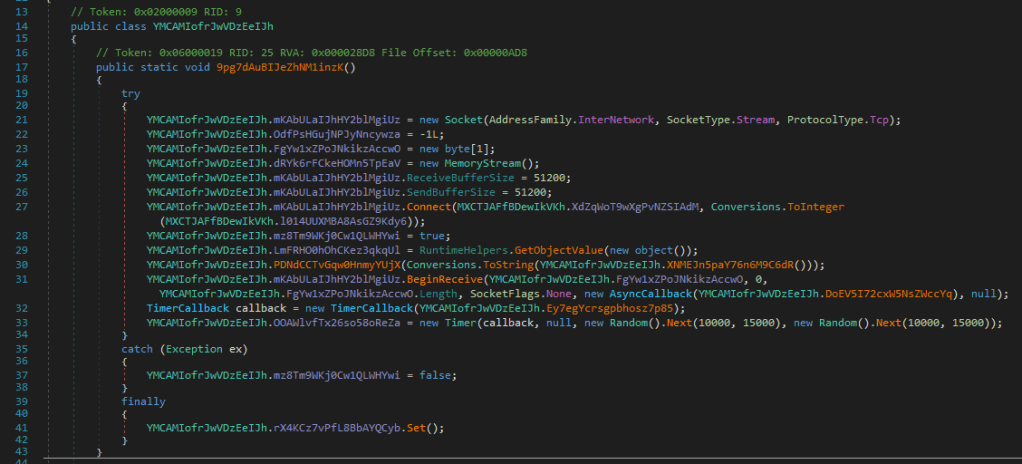
If you read the last post, you probably remember this function: It’s where we see, that it calls .Connect() on the Socket. Here we found the communication Ip-Address and the corresponding port.
What I was blind for while initially analyzing was, that it creates a new AsyncCallback Object (on line 31,2) which is called with the bytes it receives from the connection when the BeginReceive function completes.
So today we dive into this and try figure out, what it does.
So if we step into that function, which is given as parameter to the AsyncCallback object we get to the following code:
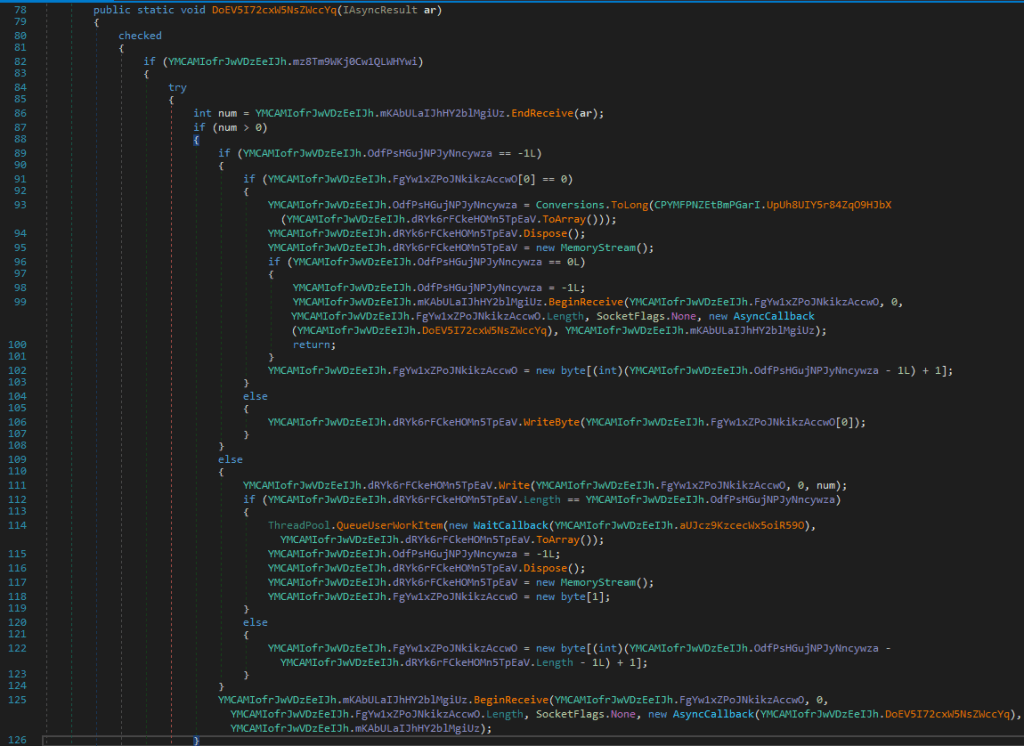
This is mainly functionality to assemble the stream, which it receives from the network connection. It writes the received chunk into a MemoryStream and then resets the the received-bytes state to -1. At the end of the function it again calls BeginReceive() with itself as the AsyncCallback method to call when it finishes. So from this we are sure, that it keeps the connection open, as long as there is an internet connection. On line 114 it creates a QueueUserWorkItem and passes a WaitCallback object with a function and the received bytes as a parameter (on line 114,2). The WaitCallback is a delegate, which is of type void(object state). So a function which has no return value and takes one parameter.
We continue following the function which is given here. The direct function calls another method of the BUBA-class which we will investigate now.
While I had a brief overlook of the function I saw, that it is huge (1700) lines of code. So I’ll not go into every detail but try to find out, what it actually does on a higher level.
First part: preparing values
- It takes the bytes it receives and decrypts them.
- This we already highlighted in the first part, it used the exact same algorithm for decryption as it uses for encryption, namely: computing the md5 hash of base64 value (which is Blackbullet in UTF) and AES (ECB mode) decrypting the bytes using this hash as a key.
- It splits the string received at
<Violet>and then goes on comparing MANY times the first value in the resulting list with operators. All comparison values are Base64 encoded.- So to parse the operators out I did some bash magic and parsed all the comparison values out:
grep -oP 'Operators.CompareString\(left, Encoding.UTF8.GetString\(Convert.FromBase64String\("([^"]+)"\)' xWormRat_ExecutionFunction.cs | sed -E 's/Operators.CompareString\(left, Encoding.UTF8.GetString\(Convert.FromBase64String\("([^"]+)"\)/\1/' > xWormRat_operators.txt
That results in 121 different operations it ‘knows’ and in each if-else branch it does something different, so we just gonna try figure out, if with the decoded operator comparison, we can figure out what it could be instead of reviewing 1700 lines of code.
The decoding of each line resulted always in another base64 string. So the instructions sent by the attacker are encoded into base64, unfortunately for us, another base64 decoding didn’t result in anything useful. Not even readable most of the times so I give you just a little overview of some operators (and the resulting hex value as it’s often not even be UTF characters):
SVNRdg== -> 21242f
RUEwRE1Baz0= -> 100d033009
Smk4bERUOEZKVDh0 -> 262f250d3f05253f2d
SmpFb0FqZ1U= -> 263128023814
RnhZPQ== -> 1716
QVFWaA== -> 010561
QVFWbg== -> 010567
This was done using the following bash command:
while read p; do printf "$p -> "; echo "$p" | base64 -d | base64 -d | xxd -p; done < xWormRat_operators.txtAs this was a dead end we have to try another approach, so I decided I’d try diving into the functions directly trying to figure out what they do.
As this takes quiet some time with all these conversions and figuring out what happens I just give you the list of capabilities of what‘s possible and if something special is found I’d highlight it:
- Creating Screenshot
- Collecting Input (keylogger functionality)
- Download file into temp directory
- Reading Systeminfo
- Creating Process given by parameter in Stream
- Navigate with Internet Explorer to given parameter value
- Run command in the shell (hidden window)
- Running Wscript shellcommand
- Calling multiple different possible functions of in-memory payload (dll, sent by C2)
RunBotKiller- In my opinion that is quiet an outstanding function which I don’t think would produce a lot of false-positives for a detection in a payload.
- findable using strings (or yara) with the b64 string:
UnVuQm90S2lsbGVy
UACClipperexc- maybe the payload could be an executable version of this: https://github.com/exc-analyzer/exc ??
injRunJSMuPreventSleep- Show/Hide Updatescreen
- BSOD (Blue-Screen-Of-Death)
- WL
- del
- install
- ENC, DEC
- GETWCamPlu
R0VUV0NhbVBsdQ==
- GETWsoundPlu
- R
0VUV3NvdW5kUGx1
- R
- logdf
- GETTCP
installEmailsXChat- =>
WGNoYXQ=
- =>
- Retrieve running process list
- Kill process
- Retrieve attached drives
- Send file content to C2
- Change file visibility attributes (Hidden/Normal)
- Run %temp%/7zip/7zip.exe (maybe this is brought here?!)
- IOC base64 value:
N3ppcFw3ei5leGU==> (7zip\7z.exe)
- IOC base64 value:
- Play audio (& stop it)
- Read registry of User:
SEtFWV9DVVJSRU5UX1VTRVJcU09GVFdBUkVc-> HKEY_CURRENT_USER\SOFTWARE\
- Send list of active windows to C2
- Download / Upload file
- ngrok
- used for secure tunneling
- Another IOC:
bmdyb2s=
- Checking if ngrok is in Temp directory
XG5ncm9rLmV4ZQ===> \ngrok.exe- if its not installed it sends ‘hrdp’ back to the C2, otherwise ‘grok’
- Next function following is payload with class called hrdp+ and function
install-ed is instantiated and called.
- Set registry value given by C2 payload
- Restarting intself as administrator
- Run file ‘3d847c5c-4f5a-4918-9e07-a96cea49048d.exe’ with parameters targetIp and gatewayIP
- hardcoded in b64:
M2Q4NDdjNWMtNGY1YS00OTE4LTllMDctYTk2Y2VhNDkwNDhkLmV4ZQ==
- Killing that same file and deleting it
- Create file with random guid as name and running it with dynamic arguments
- Run Keylogger with name: ‘
89c43fcf-5e52-4be7-a719-a26139ce636a.exe‘ from temp path as background process.- IOC =>
ODljNDNmY2YtNWU1Mi00YmU3LWE3MTktYTI2MTM5Y2U2MzZhLmV4ZQ==
- IOC =>
- Creating a file named
WinSc32.exein Temp path.- => IOC => WinSc32.exe
- checks if it runs as admin and then runs explorer.exe given the above file as parameter
- otherwise it goes on and patches amsi.dll
AmsiScanBufferand loads the assembly directly into memory.
- otherwise it goes on and patches amsi.dll
If you’re still here, thank you. I’m sure that must be dry to read but believe me, explaining the actual code would be worse. To get to a conclusion at this point I think the functionality I extracted shows quiet well the capability of the application.
For the sake of actually producing something helpful I went through it and tried to get some worthy insights. The strings used and hardcoded are sometimes interesting and could be characteristic so I thought I’m gonna try to create a yara rule (which I’m gonna refine if it matches too many false-positives or none other samples of this family)
But as you stayed until here, here’s the sample of it:
Unfortunately downloading the txt file seems to be blocked by many browsers. So I uploaded it to yaraify.abuse.ch, see: [Link to be added]
As a sidenote, the initial rule I had was too open and matched too much stuff which wasn’t really matching xWorm, so I reworked it and made it more restricted to actually match what it’s meant to.
If you dont want to leave the page, here is the rule I published on yaraify:
rule xWorm_violet_client
{
    meta:
        author = "R4ruk"
        date = "2025-09-07"
        description = "Matches xWorm violet-client payload."
        reference = "https://sidequest-lab.com/2025/09/07/XWorm-part-2-c2-command-investigation/"
        yarahub_uuid                 = "8cbbbe0e-1d24-4f7e-98aa-9fbabdc719cc"
        yarahub_license              = "CC BY-NC 4.0"
        yarahub_rule_matching_tlp    = "TLP:WHITE"
        yarahub_rule_sharing_tlp     = "TLP:WHITE"
        yarahub_reference_md5        = "9a5289879140239767ecd6437f6ffd3b"

    strings:
        $s1="\\ngrok.exe" base64wide
        $s2="HKEY_CURRENT_USER\\SOFTWARE" base64wide
        $s3="7zip\\7z.exe" base64wide
        $s4="Xchat" base64wide
        $s5="GETWsoundPlu" base64wide
        $s6="GETWCamPlu" base64wide
        $s7="WinSc32.exe" wide

        $b8="89c43fcf-5e52-4be7-a719-a26139ce636a.exe" base64wide
        $b9="3d847c5c-4f5a-4918-9e07-a96cea49048d.exe" base64wide
        $b10="RunBotKiller" base64wide
        $b11="Blackbullet" base64wide
        $b12="<Violet>" base64wide

    condition:
        4 of ($s*)
        or
        any of ($b*)
}
I hope it was an interesting journey and it helps someone!
Seeya and stay safe
R4ruk
 Sidequest Lab